Christmas Challenge 2025 – Day  24 – What is the most useful Power BI Feature?

Power BI is celebrating its 10th anniversary! To mark this milestone, I invite you to participate in the Power BI Christmas and holiday season Calendar. This special event features 24 unique challenges, each designed for you to solve and enjoy throughout the season.

A new challenge will be released every day, starting December 1st and continuing through December 24th. Each day presents a fresh opportunity to test your Power BI skills and creativity.

At the conclusion of the event, a winner will be selected from among the participants. Microsoft Finland has generously offered a prize, with further details to be provided soon.

Throughout December, we will maintain and announce a leaderboard, showcasing participants’ progress. Correct answers will also be shared. You will have two days to solve each puzzle; for example, the puzzle released on day one will close at the end of day two.

Day 24 Challenge

Merry Christmas! Happy Holiday Season! Today is the day when in Finland we celebrate Christmas. Thank you for being here for these 24 days. I hope that this puzzle serie was useful for you and there was puzzles that were challenging but not too challenging. I know few were very simple and few were perhaps larger but I tried to make it so that you would not spend your whole day with the puzzle.

Now it is time to slow down and spend some time with your family. Thank you one more time!

As today’s puzzle: please describe some feature that has made you impact or some feature that you have not understood who it works or what for that feature is for? Let’s try to cover those in a coffee break’s later. Coffee Break is a webinar serie every monday 1pm finnish time. You may find the link to join the Coffee Break here: Microsoft Data Platform User Group – Finland | Meetup

You can return the answer at: https://forms.office.com/e/WM5jtZV6Eb You have until end of day 26 to answer. As today is visualization task and there is no file attachment option on the return, just describe the answer.

This Holiday season / Christmas challenge is provided by Vesa Tikkanen and is not linked to Microsoft as company. I just want us to have a puzzle every day going towards the 24th of December. This is pure community effort without any business relations behind. As such I try to do this as professional as possible but please remind that this is just for us to have fun. Microsoft finland has promised some swag as a prize but they are not related to winner pickup process neither they get any details of attendance. Information regarding attendance is not being used in any other thing than picking up the winner. So no marketing, no contacting just Power BI puzzle every day.
Christmas Challenge 2025 – Day  23 – Statistics Centre Finland Statistics

Power BI is celebrating its 10th anniversary! To mark this milestone, I invite you to participate in the Power BI Christmas and holiday season Calendar. This special event features 24 unique challenges, each designed for you to solve and enjoy throughout the season.

A new challenge will be released every day, starting December 1st and continuing through December 24th. Each day presents a fresh opportunity to test your Power BI skills and creativity.

At the conclusion of the event, a winner will be selected from among the participants. Microsoft Finland has generously offered a prize, with further details to be provided soon.

Throughout December, we will maintain and announce a leaderboard, showcasing participants’ progress. Correct answers will also be shared. You will have two days to solve each puzzle; for example, the puzzle released on day one will close at the end of day two.

Day 23 – Challenge

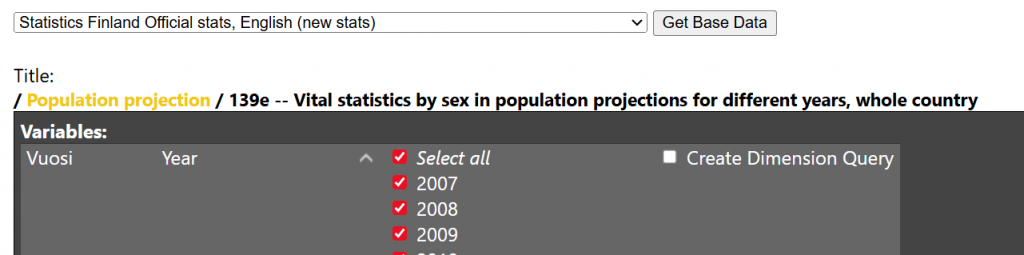
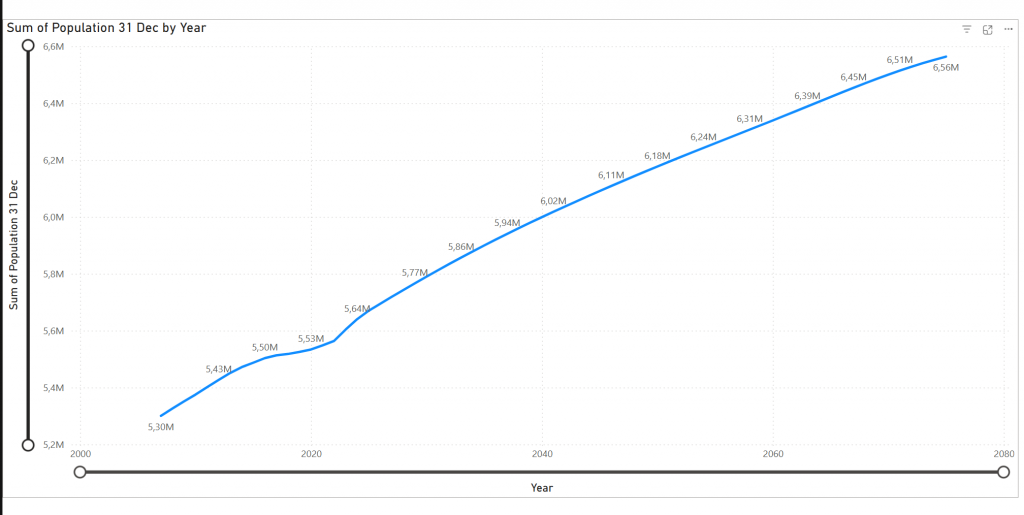
Today we map public statistical data to line chart. We want to visualize how many people there are on Finland in future based on the latest estimate of Statistics centre of Finland.

I have created a tool at http://q4.fi – which generates PowerQuery scripts for you. You can then paste these scripts into blank PowerQuery. You have to set datatypes correctly but otherwise it should be ready for consumption after that.

Create PowerQuery from:

And then press “Fact Table” at the bottom. Work your way on Power BI Desktop and final result should look like:

Describe on the answer what modifications to line chart or PowerQuery you needed to do to get to the result.

You can return the answer at: https://forms.office.com/e/EJPZtTpuYT You have until end of day 25 to answer. As today is visualization task and there is no file attachment option on the return, just describe the answer.

This Holiday season / Christmas challenge is provided by Vesa Tikkanen and is not linked to Microsoft as company. I just want us to have a puzzle every day going towards the 24th of December. This is pure community effort without any business relations behind. As such I try to do this as professional as possible but please remind that this is just for us to have fun. Microsoft finland has promised some swag as a prize but they are not related to winner pickup process neither they get any details of attendance. Information regarding attendance is not being used in any other thing than picking up the winner. So no marketing, no contacting just Power BI puzzle every day.
Christmas Challenge 2025 – Day  22 – Organisational Hierarchy Reversed

Power BI is celebrating its 10th anniversary! To mark this milestone, I invite you to participate in the Power BI Christmas and holiday season Calendar. This special event features 24 unique challenges, each designed for you to solve and enjoy throughout the season.

A new challenge will be released every day, starting December 1st and continuing through December 24th. Each day presents a fresh opportunity to test your Power BI skills and creativity.

At the conclusion of the event, a winner will be selected from among the participants. Microsoft Finland has generously offered a prize, with further details to be provided soon.

Throughout December, we will maintain and announce a leaderboard, showcasing participants’ progress. Correct answers will also be shared. You will have two days to solve each puzzle; for example, the puzzle released on day one will close at the end of day two.

Day 22 – Challenge

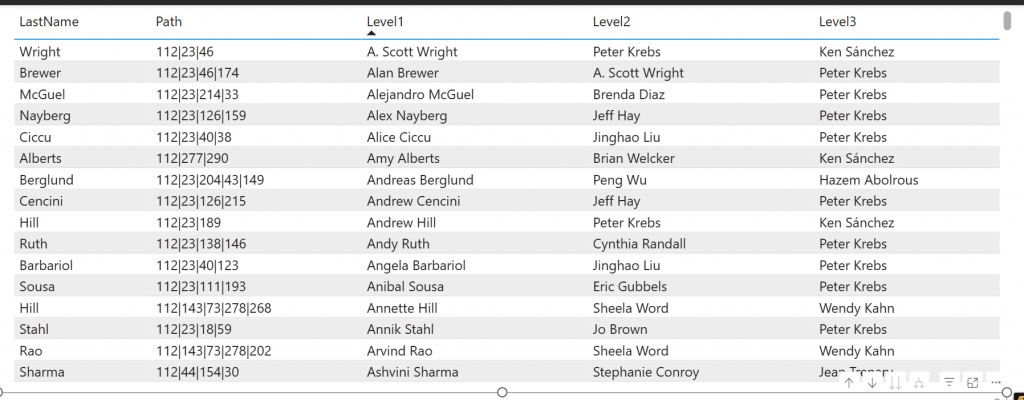
Yesterday was about organizational hierarchy. And as we always look at it. From top-to-down. From CEO-to-front line workers. But now it is opposite. Modify your yesteday’s implementation (and if you missed yesterday, there is still time to do that) and show the chart from bottom-to-up.

and

So now you start from employee and go to his/her manager and there to his/her manager etc.

Describe 3 levels to columns Level1, Level2 and Level3

Please describe your solution in a answer form.

Model can be found at: https://material.qumio.com/christmas2025/day22.zip

You can return the answer at: https://forms.office.com/e/ZMzpqKrsgt You have until end of day 24 to answer. As today is visualization task and there is no file attachment option on the return, just describe the answer.

This Holiday season / Christmas challenge is provided by Vesa Tikkanen and is not linked to Microsoft as company. I just want us to have a puzzle every day going towards the 24th of December. This is pure community effort without any business relations behind. As such I try to do this as professional as possible but please remind that this is just for us to have fun. Microsoft finland has promised some swag as a prize but they are not related to winner pickup process neither they get any details of attendance. Information regarding attendance is not being used in any other thing than picking up the winner. So no marketing, no contacting just Power BI puzzle every day.
Christmas Challenge 2025 – Day  21 – Organisational Hierarchy

Power BI is celebrating its 10th anniversary! To mark this milestone, I invite you to participate in the Power BI Christmas and holiday season Calendar. This special event features 24 unique challenges, each designed for you to solve and enjoy throughout the season.

A new challenge will be released every day, starting December 1st and continuing through December 24th. Each day presents a fresh opportunity to test your Power BI skills and creativity.

At the conclusion of the event, a winner will be selected from among the participants. Microsoft Finland has generously offered a prize, with further details to be provided soon.

Throughout December, we will maintain and announce a leaderboard, showcasing participants’ progress. Correct answers will also be shared. You will have two days to solve each puzzle; for example, the puzzle released on day one will close at the end of day two.

Day 21 – Challenge

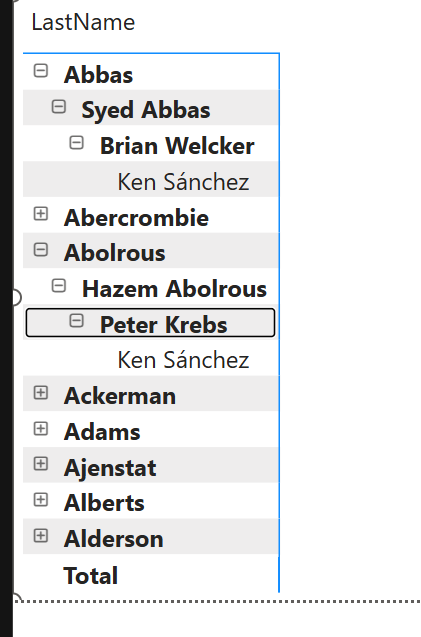
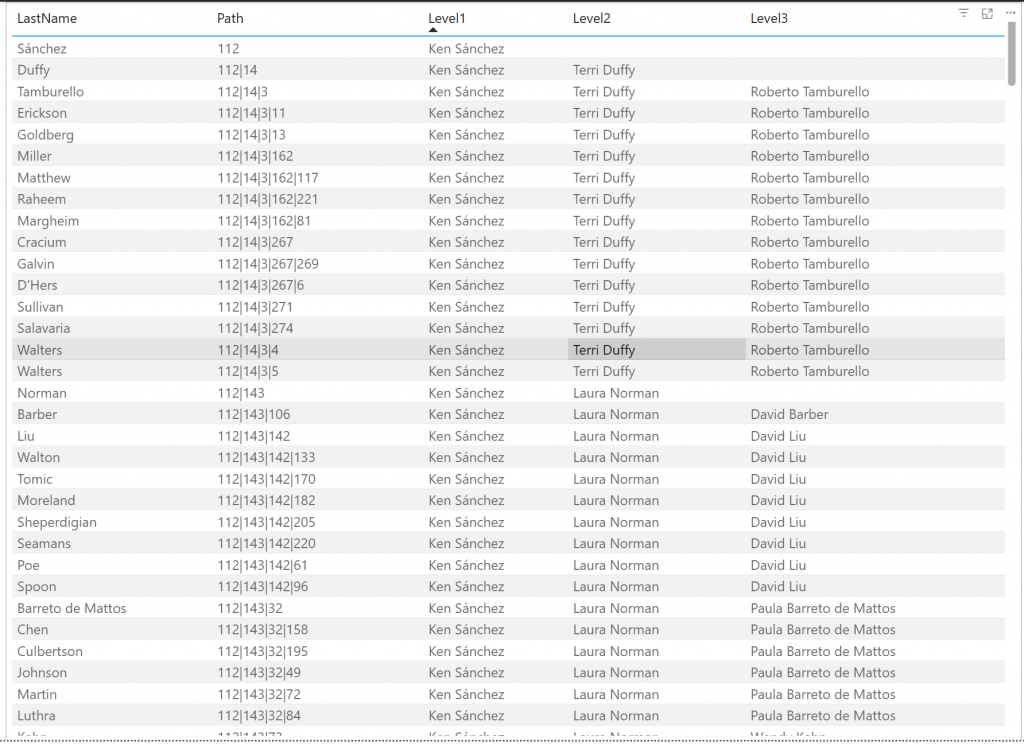
You quessed right! This requirement will come always some day. Implement organizational hierarchy. There is DimEmployee table which has EmployeeKey and ParentEmployeeKey. ParentEmployeeKey defines who is the manager of the person.

Power BI does not support parent-child-hierarchies so we need to make this tabular.

Implement 4 new columns.

Path: describes the path in the parent-child hierarchy

Level1 is the Company director

Level2 are persons reporting to company director

Level3 are the persons reporting to Level2 persons

Please describe your solution in a answer form.

Model can be found at: https://material.qumio.com/christmas2025/day21.zip

You can return the answer at: https://forms.office.com/e/S9B2S54P4U You have until end of day 23 to answer. As today is visualization task and there is no file attachment option on the return, just describe the answer.

This Holiday season / Christmas challenge is provided by Vesa Tikkanen and is not linked to Microsoft as company. I just want us to have a puzzle every day going towards the 24th of December. This is pure community effort without any business relations behind. As such I try to do this as professional as possible but please remind that this is just for us to have fun. Microsoft finland has promised some swag as a prize but they are not related to winner pickup process neither they get any details of attendance. Information regarding attendance is not being used in any other thing than picking up the winner. So no marketing, no contacting just Power BI puzzle every day.
Christmas Challenge 2025 – Day  20 – Moving average at visual level

Power BI is celebrating its 10th anniversary! To mark this milestone, I invite you to participate in the Power BI Christmas and holiday season Calendar. This special event features 24 unique challenges, each designed for you to solve and enjoy throughout the season.

A new challenge will be released every day, starting December 1st and continuing through December 24th. Each day presents a fresh opportunity to test your Power BI skills and creativity.

At the conclusion of the event, a winner will be selected from among the participants. Microsoft Finland has generously offered a prize, with further details to be provided soon.

Throughout December, we will maintain and announce a leaderboard, showcasing participants’ progress. Correct answers will also be shared. You will have two days to solve each puzzle; for example, the puzzle released on day one will close at the end of day two.

Day 20 – Challenge

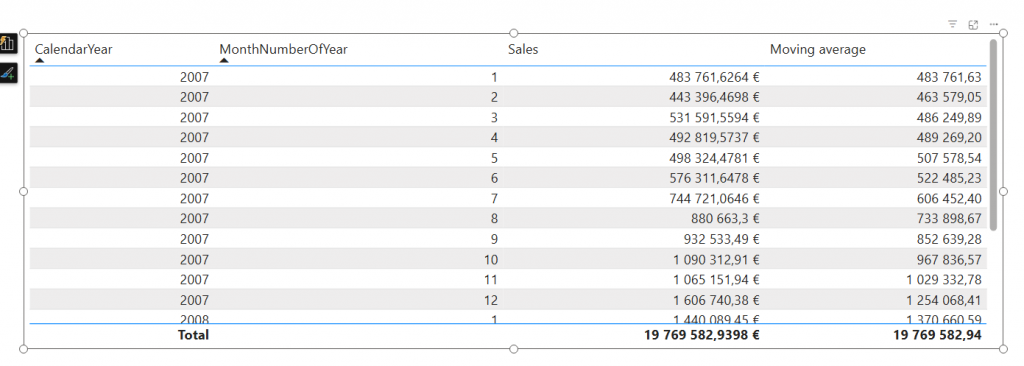
Today it is about Visual calcs again! Moving average is a common problem we solved with DAX few days ago. Now we would like to solve the same problem but using only visual calculations.

Add to the report’s table visual a new visual calc that counts moving average over last 3 rows.

Please describe your solution in a answer form.

Model can be found at: https://material.qumio.com/christmas2025/day20.zip

You can return the answer at: https://forms.office.com/e/CwwEGhsCSe You have until end of day 21 to answer. As today is visualization task and there is no file attachment option on the return, just describe the answer.

This Holiday season / Christmas challenge is provided by Vesa Tikkanen and is not linked to Microsoft as company. I just want us to have a puzzle every day going towards the 24th of December. This is pure community effort without any business relations behind. As such I try to do this as professional as possible but please remind that this is just for us to have fun. Microsoft finland has promised some swag as a prize but they are not related to winner pickup process neither they get any details of attendance. Information regarding attendance is not being used in any other thing than picking up the winner. So no marketing, no contacting just Power BI puzzle every day.
Christmas Challenge 2025 – Day  19 – weighted average

Power BI is celebrating its 10th anniversary! To mark this milestone, I invite you to participate in the Power BI Christmas and holiday season Calendar. This special event features 24 unique challenges, each designed for you to solve and enjoy throughout the season.

A new challenge will be released every day, starting December 1st and continuing through December 24th. Each day presents a fresh opportunity to test your Power BI skills and creativity.

At the conclusion of the event, a winner will be selected from among the participants. Microsoft Finland has generously offered a prize, with further details to be provided soon.

Throughout December, we will maintain and announce a leaderboard, showcasing participants’ progress. Correct answers will also be shared. You will have two days to solve each puzzle; for example, the puzzle released on day one will close at the end of day two.

Day 19 challenge

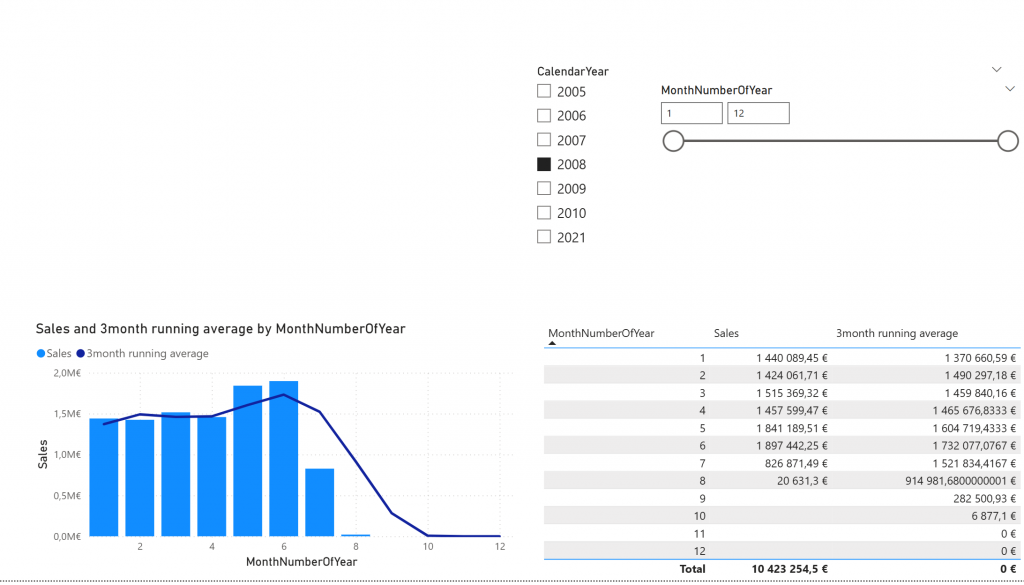
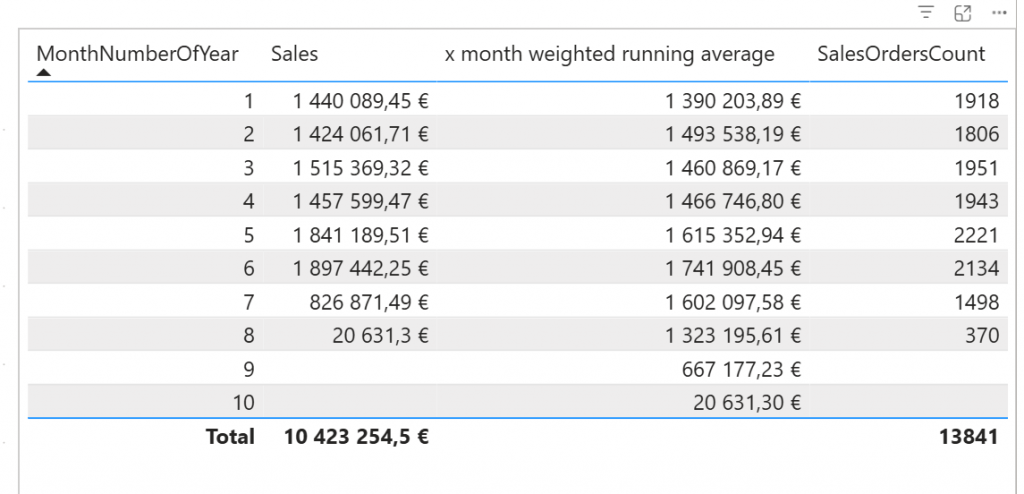
This is not more difficult but it requires a bit more math. Let’s continue on yesterday’s x month average measure. We need to modify that to be weighted average based on number of sales orders per month.

Above image shows the answer when weighted average is calculated over 3 months period in year 2008.

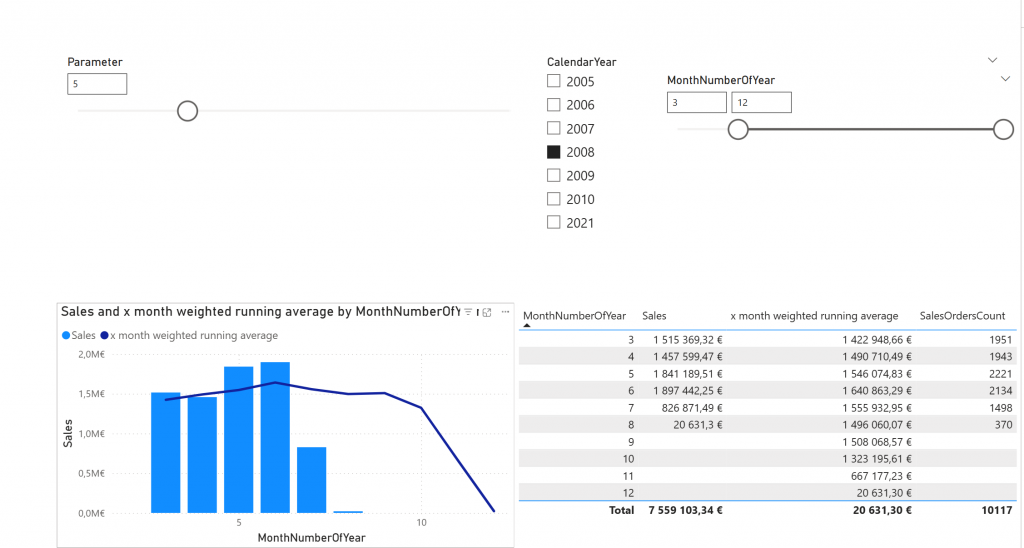
Here another example:

So You can choose timeslice. Then you can choose from the parameter how many months the weighted average is counted from and then you show the result at line and matrix visual.

Weight is based on the SalesOrdersCount and average is over Sales.

Please describe your solution in a answer form.

Model can be found at: https://material.qumio.com/christmas2025/day19.zip

You can return the answer at: https://forms.office.com/e/pfdYDXFzdE You have until end of day 21 to answer. As today is visualization task and there is no file attachment option on the return, just describe the answer.

This Holiday season / Christmas challenge is provided by Vesa Tikkanen and is not linked to Microsoft as company. I just want us to have a puzzle every day going towards the 24th of December. This is pure community effort without any business relations behind. As such I try to do this as professional as possible but please remind that this is just for us to have fun. Microsoft finland has promised some swag as a prize but they are not related to winner pickup process neither they get any details of attendance. Information regarding attendance is not being used in any other thing than picking up the winner. So no marketing, no contacting just Power BI puzzle every day.
Christmas Challenge 2025 – Day  18 – Dynamic moving average

Power BI is celebrating its 10th anniversary! To mark this milestone, I invite you to participate in the Power BI Christmas and holiday season Calendar. This special event features 24 unique challenges, each designed for you to solve and enjoy throughout the season.

A new challenge will be released every day, starting December 1st and continuing through December 24th. Each day presents a fresh opportunity to test your Power BI skills and creativity.

At the conclusion of the event, a winner will be selected from among the participants. Microsoft Finland has generously offered a prize, with further details to be provided soon.

Throughout December, we will maintain and announce a leaderboard, showcasing participants’ progress. Correct answers will also be shared. You will have two days to solve each puzzle; for example, the puzzle released on day one will close at the end of day two.

Day 18 – Challenge

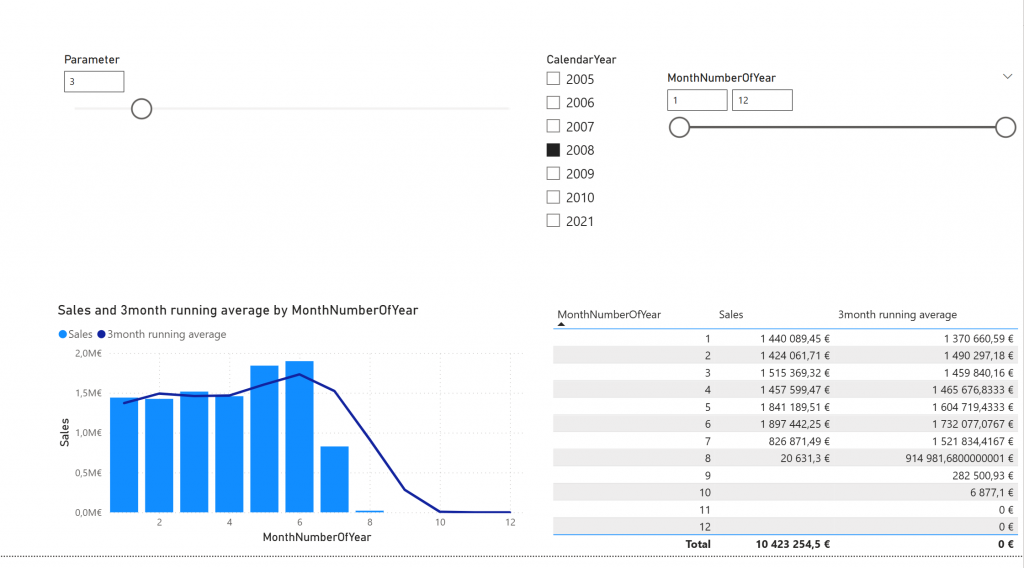
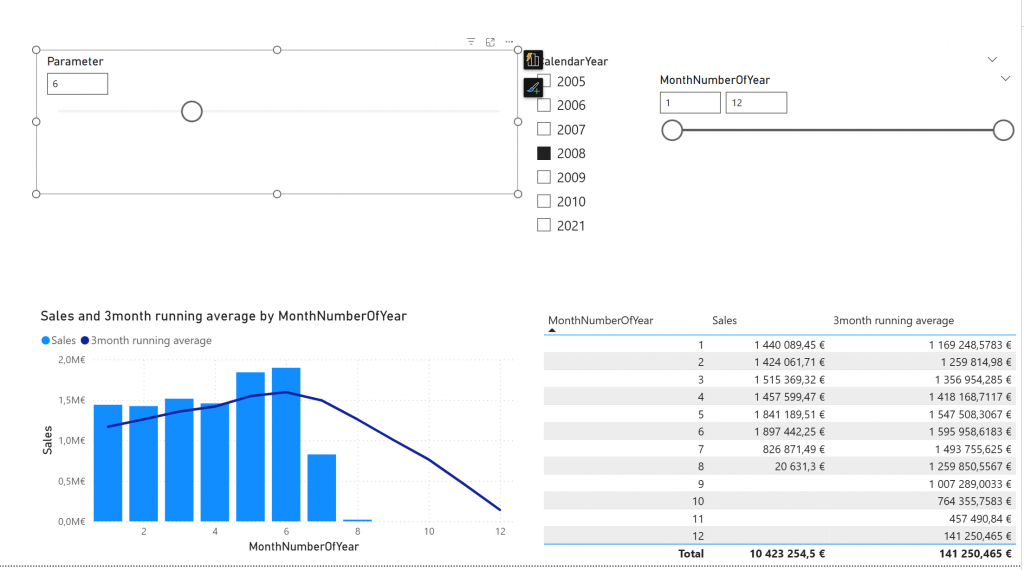
Today’s challenge is about enhancing that moving average measure. Yesterday it was static 3-months. Now it should be modified so that you can choose how many months the moving average is about.

Above is the 3 month average and after sliding the slider it changes to something else like 6 month moving average:

Please describe your solution in a answer form.

Model can be found at: https://material.qumio.com/christmas2025/day18.zip

You can return the answer at: https://forms.office.com/e/NBy5rKV1XS You have until end of day 20 to answer. As today is visualization task and there is no file attachment option on the return, just describe the answer.

This Holiday season / Christmas challenge is provided by Vesa Tikkanen and is not linked to Microsoft as company. I just want us to have a puzzle every day going towards the 24th of December. This is pure community effort without any business relations behind. As such I try to do this as professional as possible but please remind that this is just for us to have fun. Microsoft finland has promised some swag as a prize but they are not related to winner pickup process neither they get any details of attendance. Information regarding attendance is not being used in any other thing than picking up the winner. So no marketing, no contacting just Power BI puzzle every day.
Christmas Challenge 2025 – Day  17 – Moving average

Power BI is celebrating its 10th anniversary! To mark this milestone, I invite you to participate in the Power BI Christmas and holiday season Calendar. This special event features 24 unique challenges, each designed for you to solve and enjoy throughout the season.

A new challenge will be released every day, starting December 1st and continuing through December 24th. Each day presents a fresh opportunity to test your Power BI skills and creativity.

At the conclusion of the event, a winner will be selected from among the participants. Microsoft Finland has generously offered a prize, with further details to be provided soon.

Throughout December, we will maintain and announce a leaderboard, showcasing participants’ progress. Correct answers will also be shared. You will have two days to solve each puzzle; for example, the puzzle released on day one will close at the end of day two.

Day 17 Challenge

Today it is about moving average. Your task is to calculate moving average of 3 months for any given date. If longer period than date is shown it will be 3 months before the end-of-period. I mean that if month’s are shown as columns, moving average is 3 months average up-to-end-of-shown month. If years would be shown the 3month average would be oct-nov-dec.

Your task is to create 3month moving average -measure.

Please describe your solution in a answer form.

Model can be found at: https://material.qumio.com/christmas2025/day17.zip

You can return the answer at: https://forms.office.com/e/MgksvgCvh5 You have until end of day 18 to answer. As today is visualization task and there is no file attachment option on the return, just describe the answer.

This Holiday season / Christmas challenge is provided by Vesa Tikkanen and is not linked to Microsoft as company. I just want us to have a puzzle every day going towards the 24th of December. This is pure community effort without any business relations behind. As such I try to do this as professional as possible but please remind that this is just for us to have fun. Microsoft finland has promised some swag as a prize but they are not related to winner pickup process neither they get any details of attendance. Information regarding attendance is not being used in any other thing than picking up the winner. So no marketing, no contacting just Power BI puzzle every day.
Christmas Challenge 2025 – Day  16 – Sales vs total sales of selected time

Power BI is celebrating its 10th anniversary! To mark this milestone, I invite you to participate in the Power BI Christmas and holiday season Calendar. This special event features 24 unique challenges, each designed for you to solve and enjoy throughout the season.

A new challenge will be released every day, starting December 1st and continuing through December 24th. Each day presents a fresh opportunity to test your Power BI skills and creativity.

At the conclusion of the event, a winner will be selected from among the participants. Microsoft Finland has generously offered a prize, with further details to be provided soon.

Throughout December, we will maintain and announce a leaderboard, showcasing participants’ progress. Correct answers will also be shared. You will have two days to solve each puzzle; for example, the puzzle released on day one will close at the end of day two.

Day 16 – Challenge

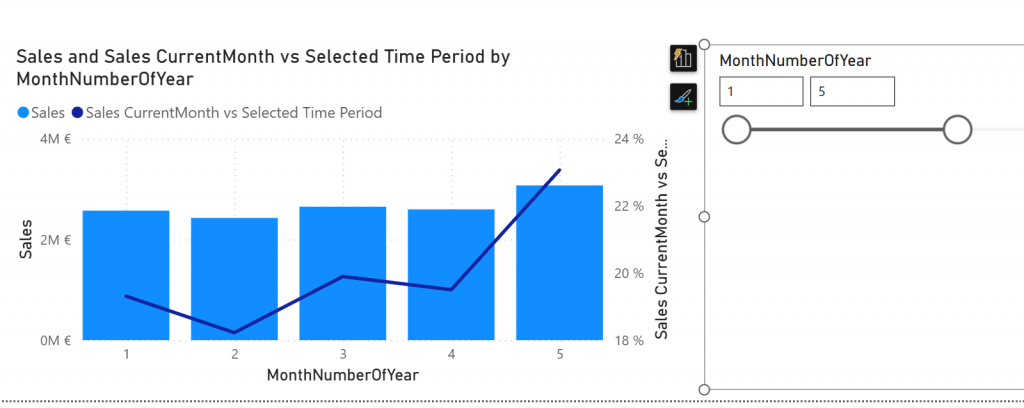
Today it is about execution context. You have to design measure that calculates Sales comparison between selected month against the whole selected month-slider.

Sales -measure is ready on the model. “Sales CurrentMonth vs Selected Time Period” measure is there but it is not ready. Your task is to modify that measure so that line chart works.

Line chart shows how many percentage month’s sales is against the selected time from the month-slider on the right.

Please describe your solution in a answer form.

Model can be found at: https://material.qumio.com/christmas2025/day16.zip

You can return the answer at: https://forms.office.com/e/pgLcq3fZ53 You have until end of day 18 to answer. As today is visualization task and there is no file attachment option on the return, just describe the answer.

This Holiday season / Christmas challenge is provided by Vesa Tikkanen and is not linked to Microsoft as company. I just want us to have a puzzle every day going towards the 24th of December. This is pure community effort without any business relations behind. As such I try to do this as professional as possible but please remind that this is just for us to have fun. Microsoft finland has promised some swag as a prize but they are not related to winner pickup process neither they get any details of attendance. Information regarding attendance is not being used in any other thing than picking up the winner. So no marketing, no contacting just Power BI puzzle every day.
Christmas Challenge 2025 – Day  15 – Formatting measures

Power BI is celebrating its 10th anniversary! To mark this milestone, I invite you to participate in the Power BI Christmas and holiday season Calendar. This special event features 24 unique challenges, each designed for you to solve and enjoy throughout the season.

A new challenge will be released every day, starting December 1st and continuing through December 24th. Each day presents a fresh opportunity to test your Power BI skills and creativity.

At the conclusion of the event, a winner will be selected from among the participants. Microsoft Finland has generously offered a prize, with further details to be provided soon.

Throughout December, we will maintain and announce a leaderboard, showcasing participants’ progress. Correct answers will also be shared. You will have two days to solve each puzzle; for example, the puzzle released on day one will close at the end of day two.

Day 15 – Challenge

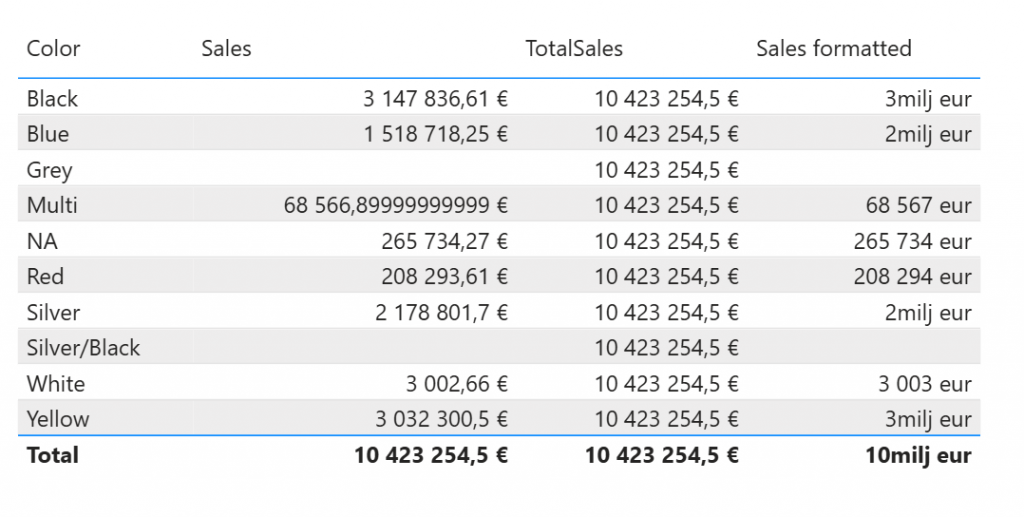
Today you need to satisfy the formatting requirement from your users. You need to do something for the Sales formatted measure. It should output results as shown below.

In detail: If measure is less than 1 million, it should output number as whole number with suffix ” eur” and if it is above million it should be whole number also but only full millions and suffix “milj eur”.

Please describe your solution in a answer form.

Model can be found at: https://material.qumio.com/christmas2025/day15.zip

You can return the answer at: https://forms.office.com/e/F1dmzu0RUi You have until end of day 17 to answer. As today is visualization task and there is no file attachment option on the return, just describe the answer.

This Holiday season / Christmas challenge is provided by Vesa Tikkanen and is not linked to Microsoft as company. I just want us to have a puzzle every day going towards the 24th of December. This is pure community effort without any business relations behind. As such I try to do this as professional as possible but please remind that this is just for us to have fun. Microsoft finland has promised some swag as a prize but they are not related to winner pickup process neither they get any details of attendance. Information regarding attendance is not being used in any other thing than picking up the winner. So no marketing, no contacting just Power BI puzzle every day.