Answers for Christmas challenge days 17-24

Final batch of answers.

Day  17 – Moving average

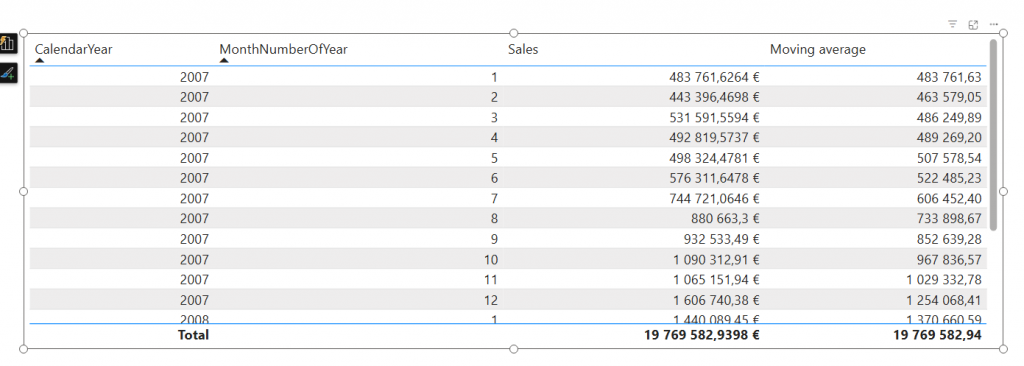
Fixed length moving average problem was about DAX measure. You could write measure like:
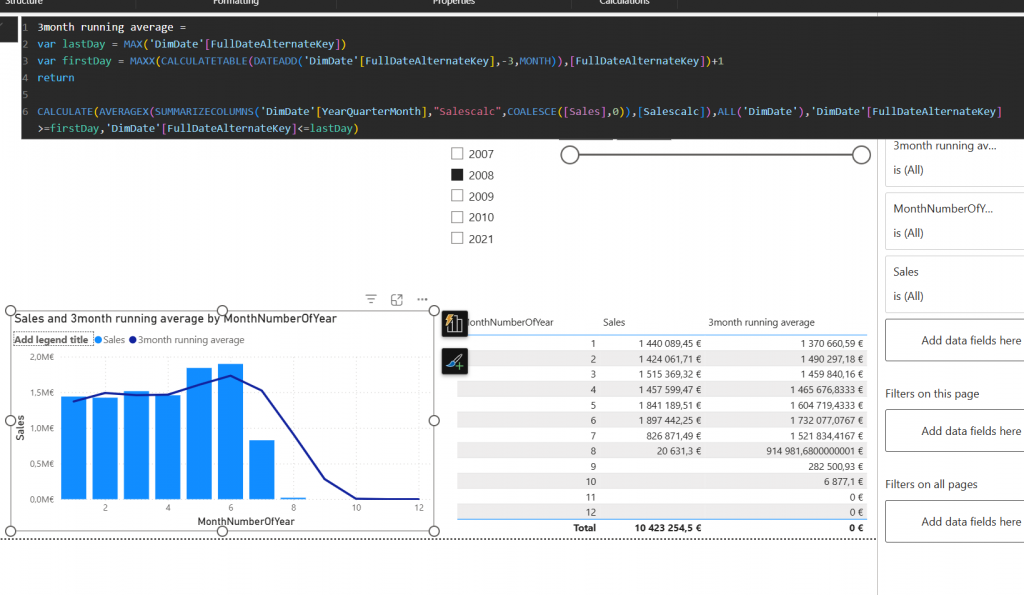
3month running average =
var lastDay = MAX(‘DimDate'[FullDateAlternateKey])
var firstDay = MAXX(CALCULATETABLE(DATEADD(‘DimDate'[FullDateAlternateKey],-3,MONTH)),[FullDateAlternateKey])+1
return
CALCULATE(AVERAGEX(SUMMARIZECOLUMNS(‘DimDate'[YearQuarterMonth],”Salescalc”,COALESCE([Sales],0)),[Salescalc]),ALL(‘DimDate’),’DimDate'[FullDateAlternateKey]>=firstDay,’DimDate'[FullDateAlternateKey]<=lastDay)

Idea is to find the last day selected and then calculate backwards 3 months and free the date dimension.

Day  18 – Dynamic moving

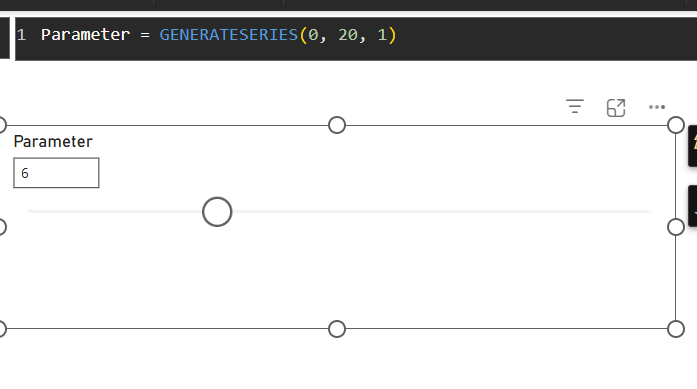
This day was about changing that fixed length 3 month moving average to dynamic. Purpose was to add parameter to report which would allow user to choose how many months the average would be calculated on.

Answer is 2 parts. First the measure:
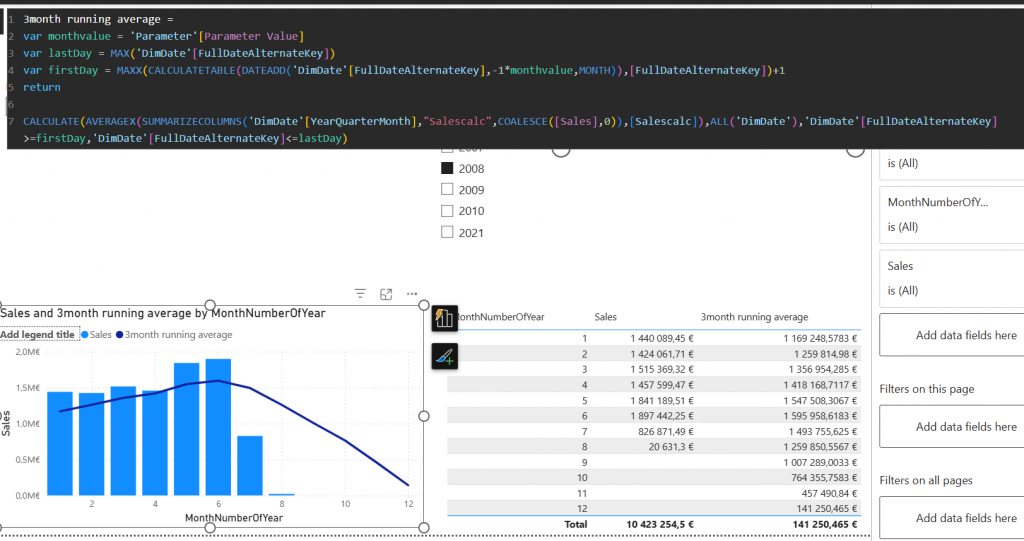
Another part of the solution is the parameter which end user is using to select the month count
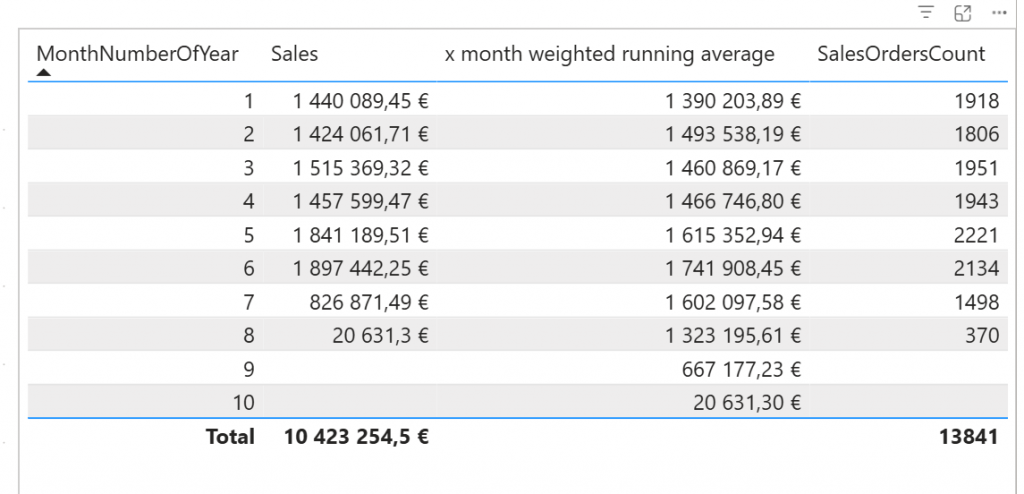
Day  19 – weighted average

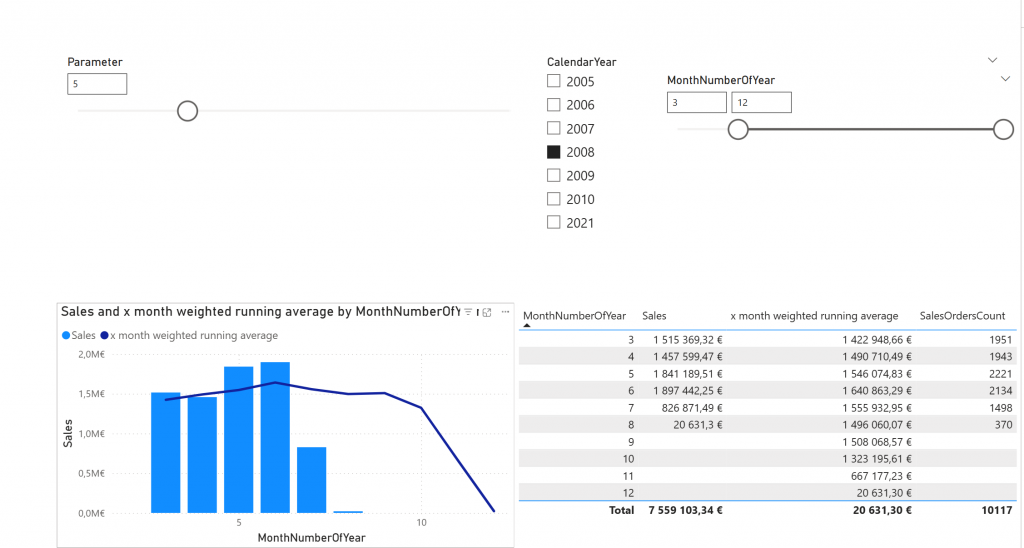
Weighted average is a bit harder problem. It requires the “weight”. In our puzzle weight was about sales order count. So let’s first calculate the weight:
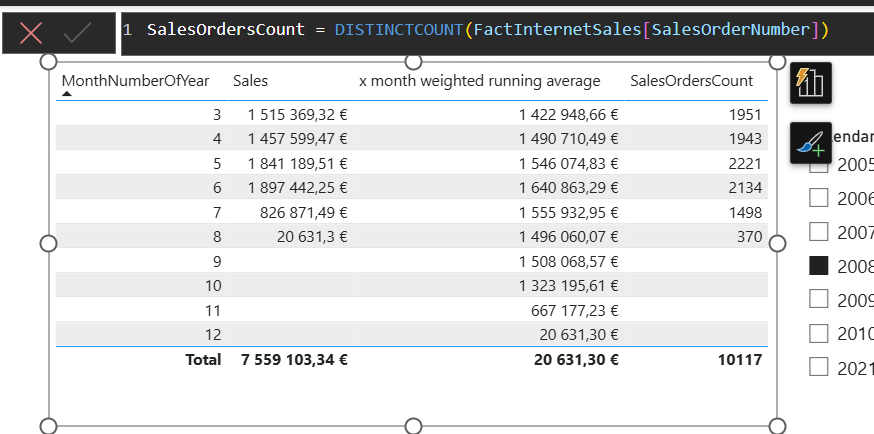
Then this weight is used in actual calculation by multiplying the sales per month with the weight in every month. This is done with sumx
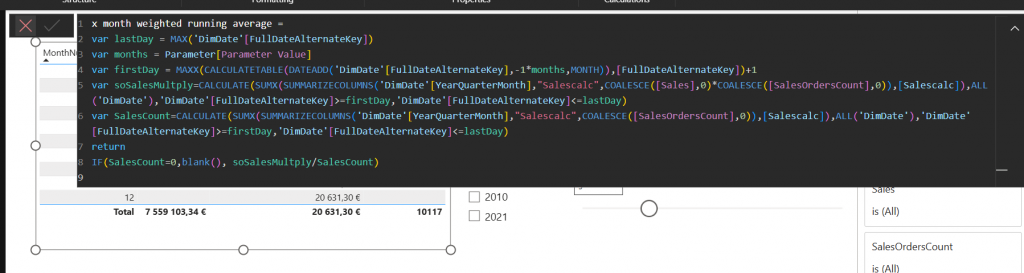
And then divided by the total sales orders count.

Day  20 – Moving average at visual level

Previous day was about Weighted average in DAX. What about visual calc?
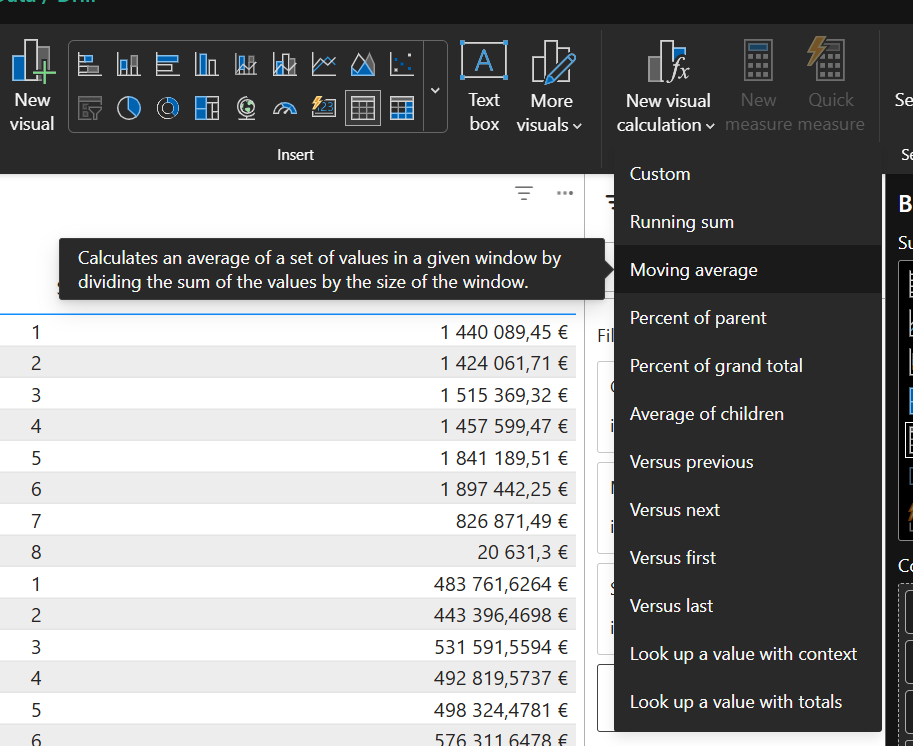
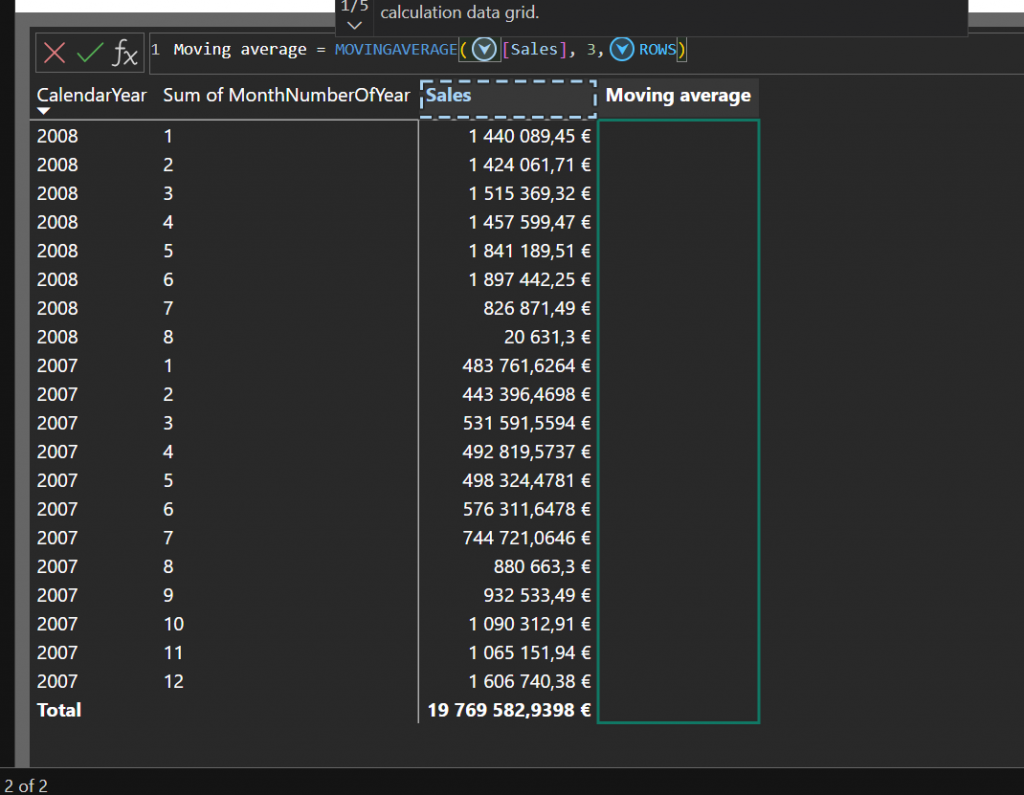
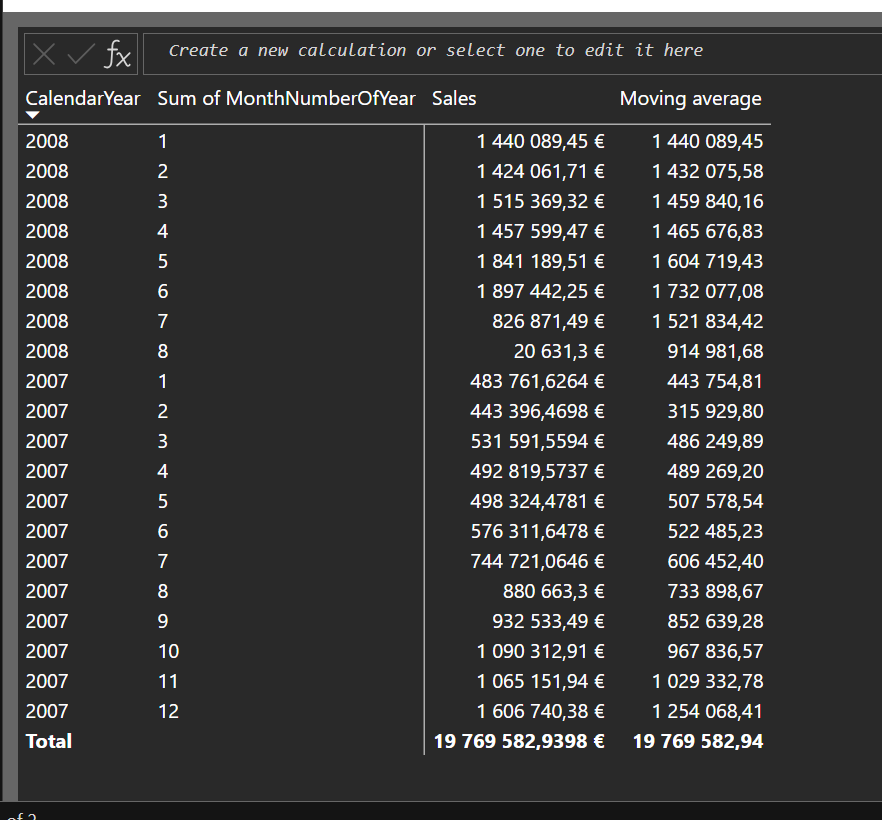
There is prebuilt option to moving average.
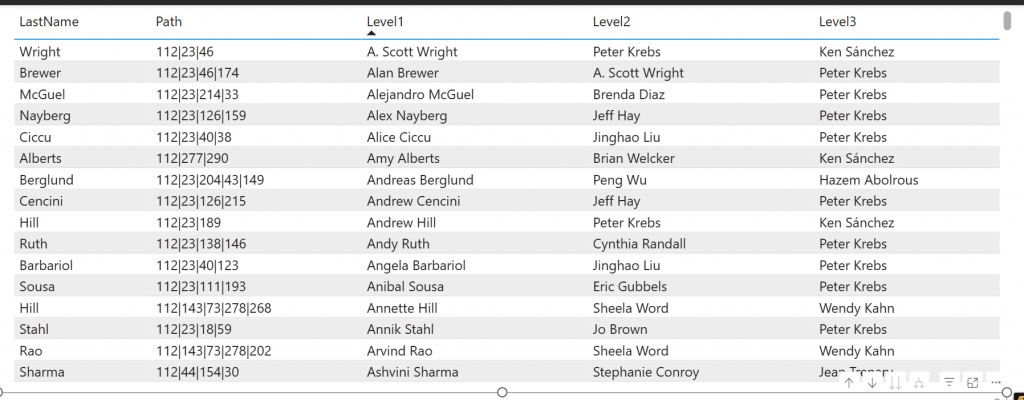
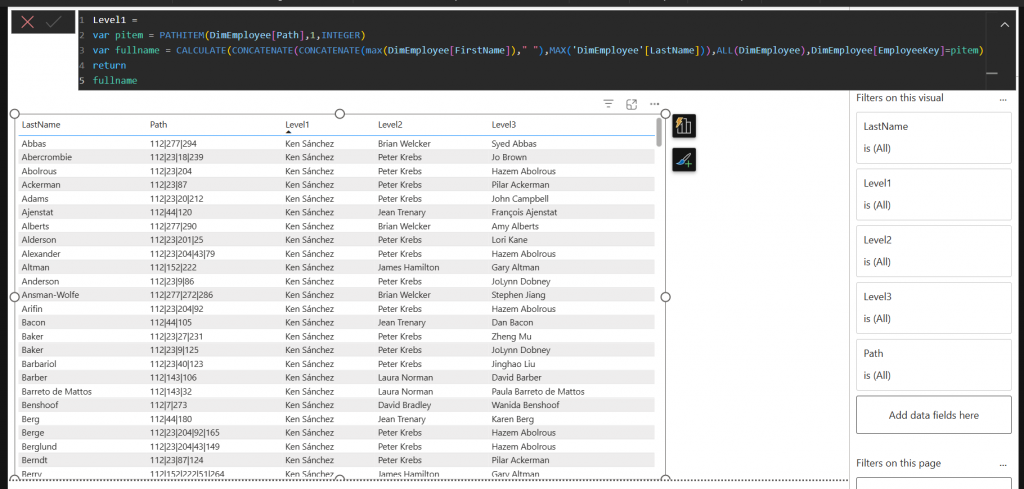
Day  21 – Organisational Hierarchy

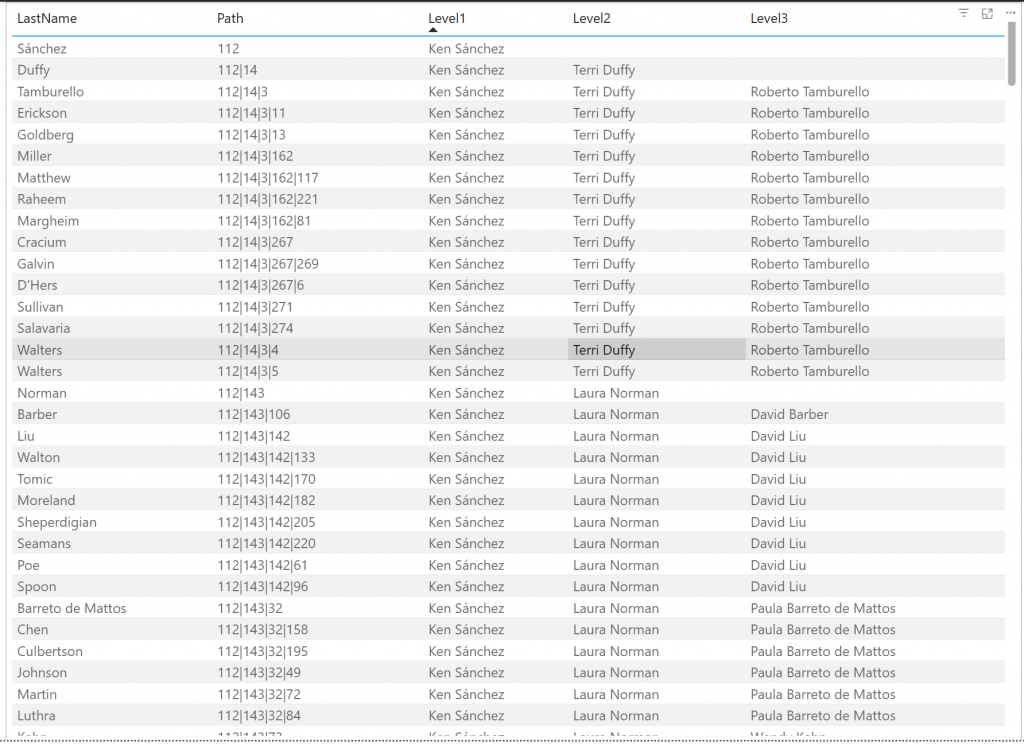
Organizational hierarchy is something everyone needs to implement some day. Idea is to calculate column that have hierarchy calculated as path column.
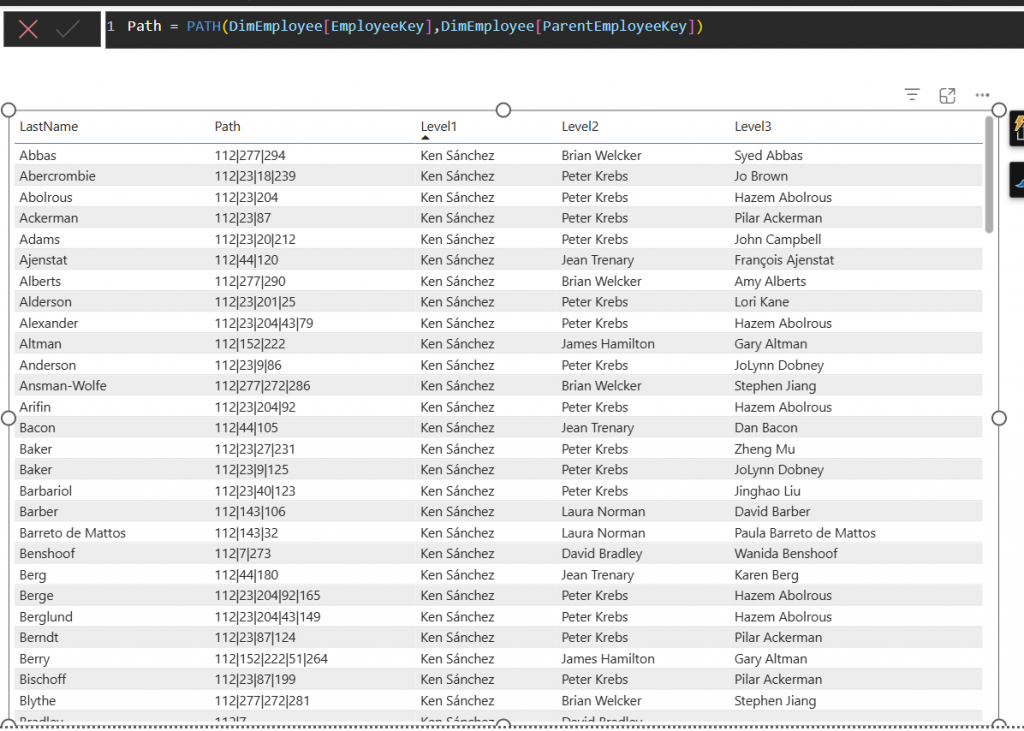
Each level is then showed as calculated columns
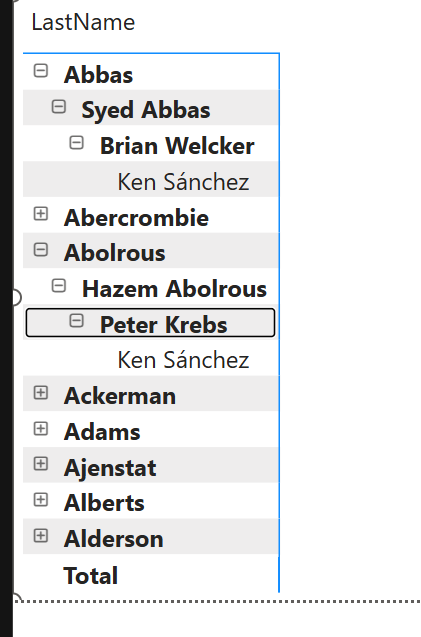
Day  22 – Organisational Hierarchy Reversed

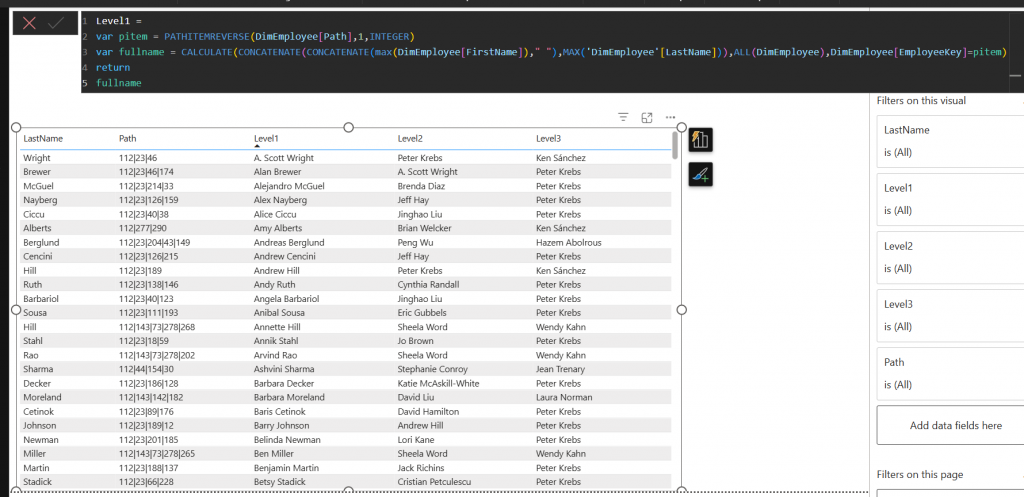
From bottom-to-up hierarchy is pretty similar but using slightly different functions.

There is PATHITEMREVERSE function that we use here.
Day  23 – Statistics Centre Finland Statistics

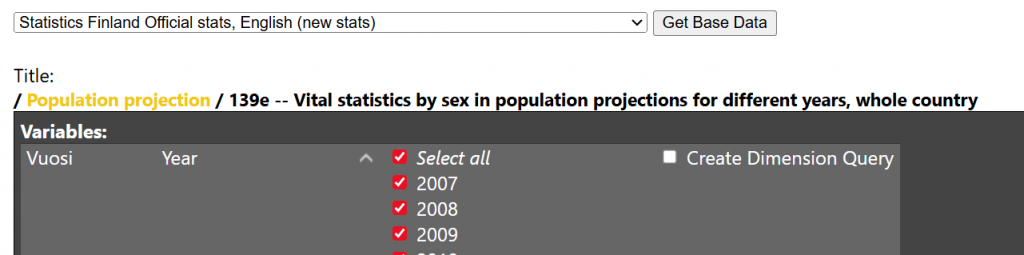
This was more like follow the instructions. q4.fi is a tool to generate power queries and as there was no single answer this one was to let you familiarize with the tool.

Day  24 – What is the most useful Power BI Feature?

And this was a question to you! For this one I got 17 answers. Each answer was about different topic. People were saying something was good but there were also many complaints.

Good things were in more advanced editoring/coding experiences Power BI is getting. This included tmdl editor, dax query view and DAX enhancements.

Critics were against certain specific features like some visuals not working as intended. Some visuals that should be default visuals only available in market place and about general scalable reporting. Power BI is still heavily towards interactive reporting and not so much of fixed reporting (which Microsoft tries to cover with SSRS reports).

Also there was a critics about how my q4.fi works or atleast how you copy data from there… I need to look that as I was not aware of that bug.
Answers for Christmas challenge 2025 days 9-16

Here is answer for Christmas Challenge 2025 days 9-16

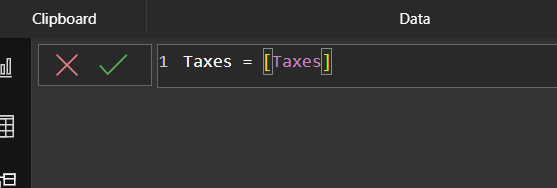
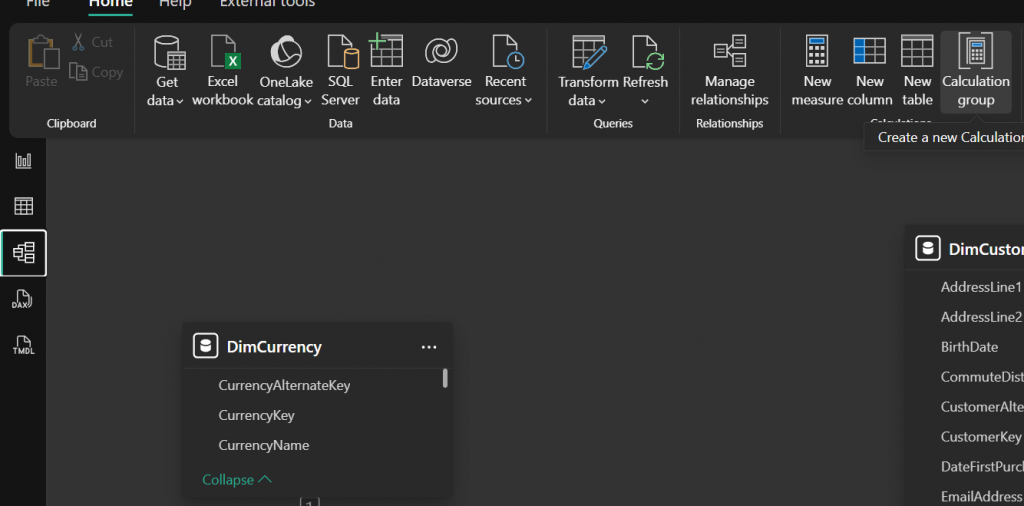
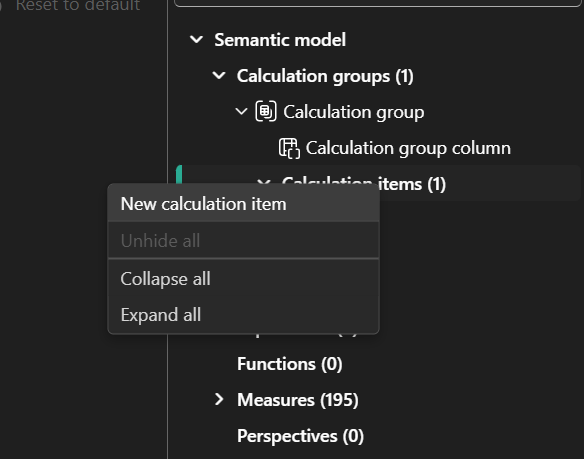
Day 9 – One Visual, Multiple different measures

s

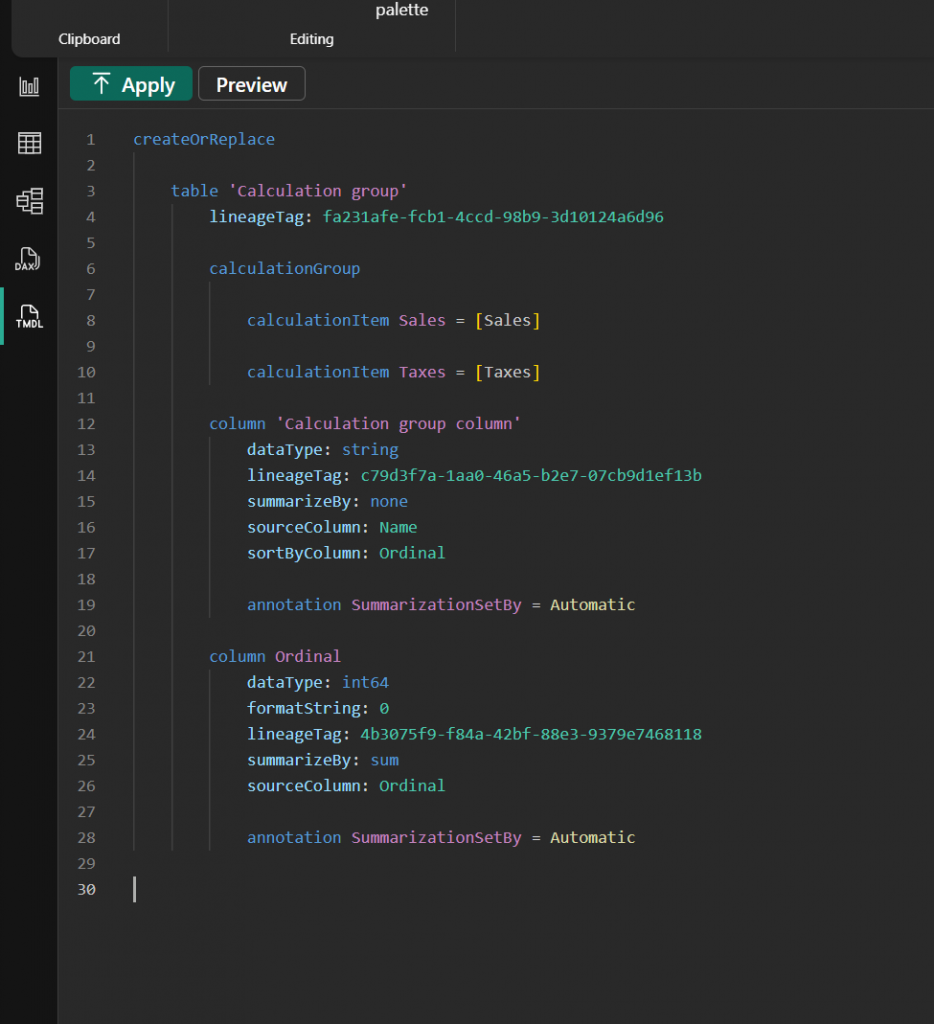
When scripting this to TMDL it looks like:

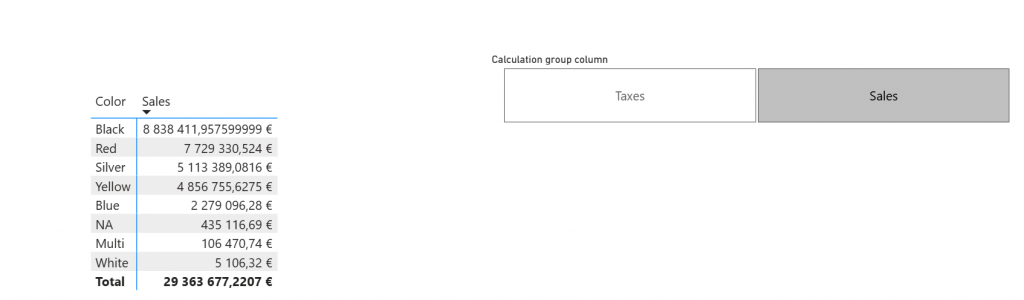
And then you can add a slicer of the calculation group and that changes how the visual behaves.

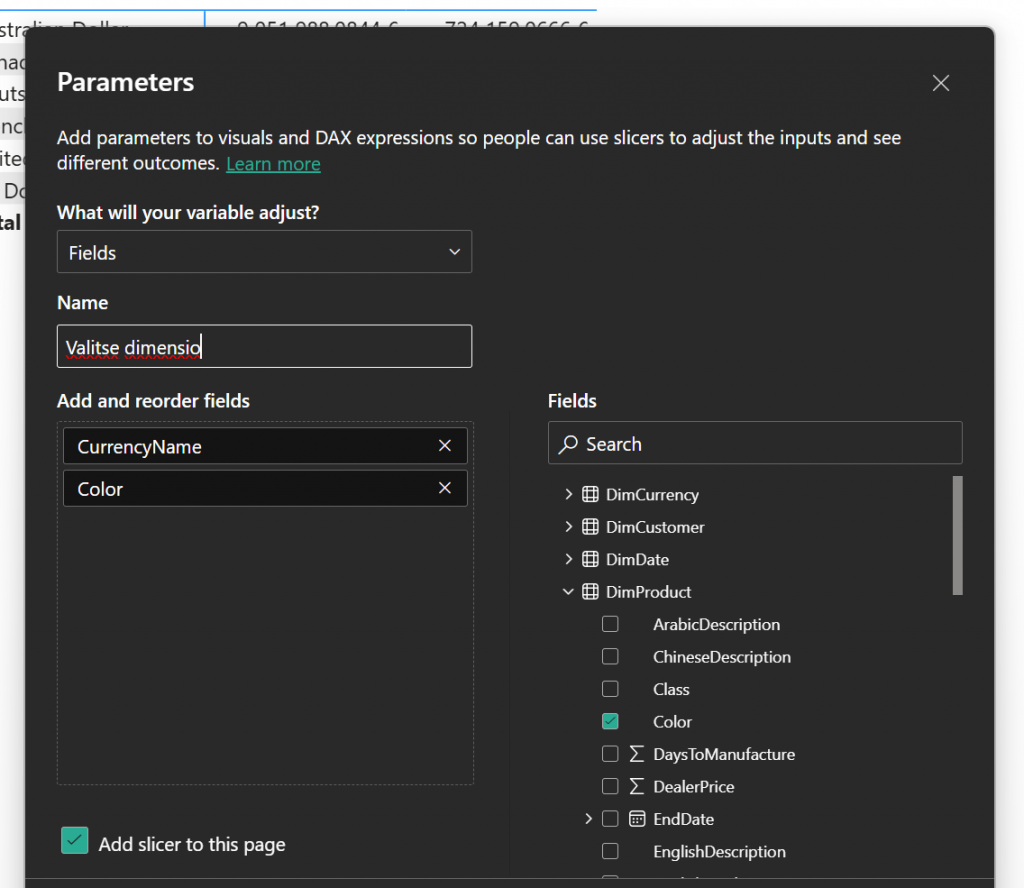
Day 10 – Visuals that change dimensions on the fly

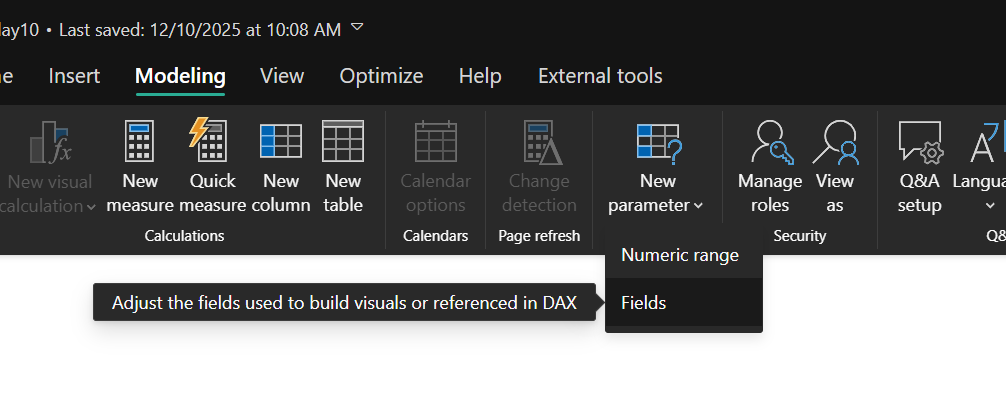
Day 10 was about field parameters.

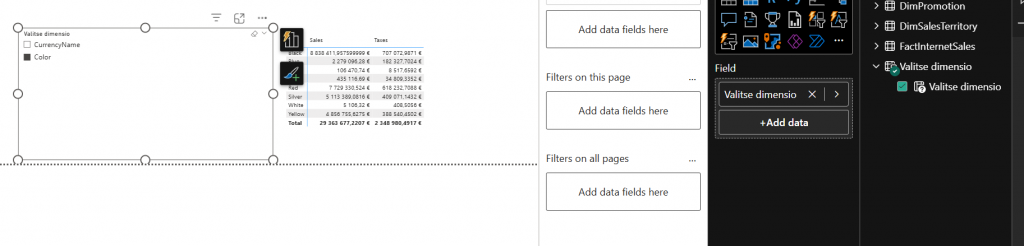
Then we can create visual that uses new “valitse dimensio” field and slicer from that field also. And it just works.

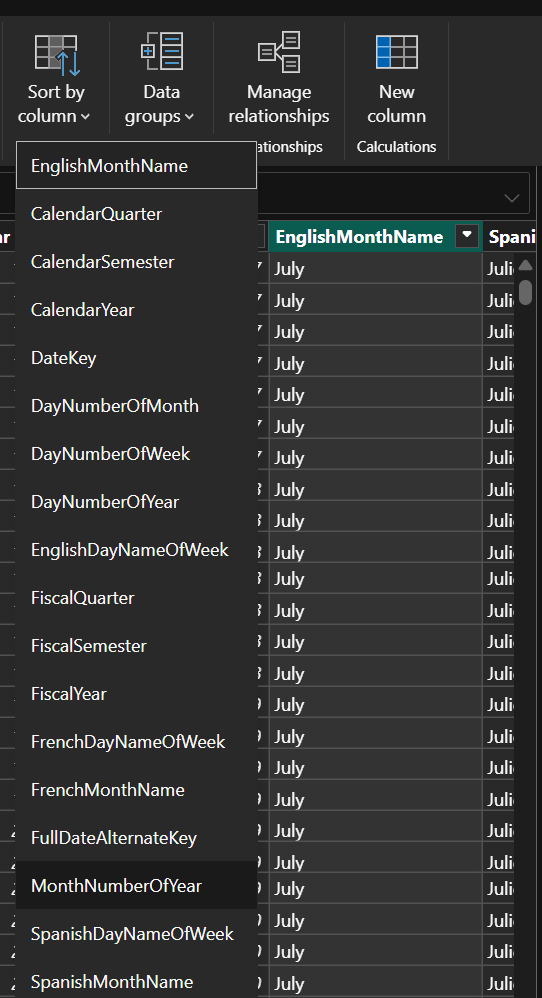
Day  11 – Making months work

This was easy. It is order by column.

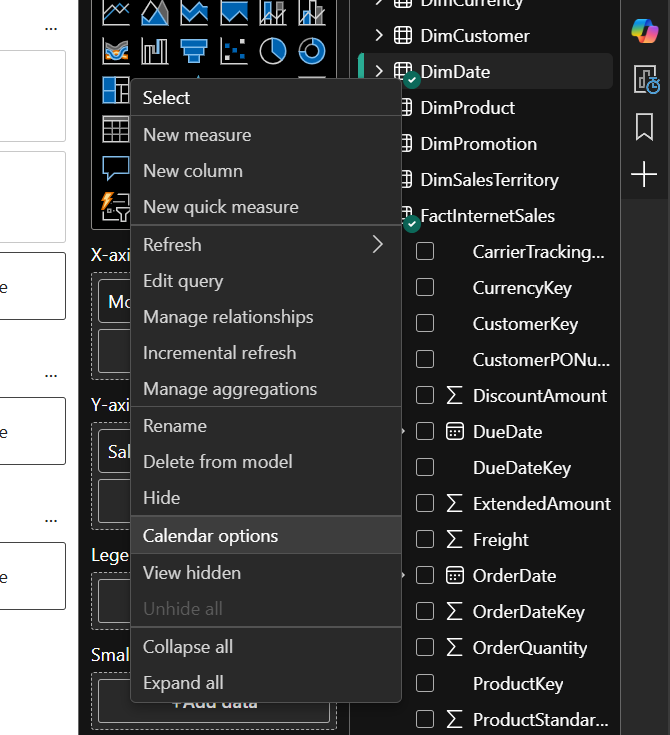
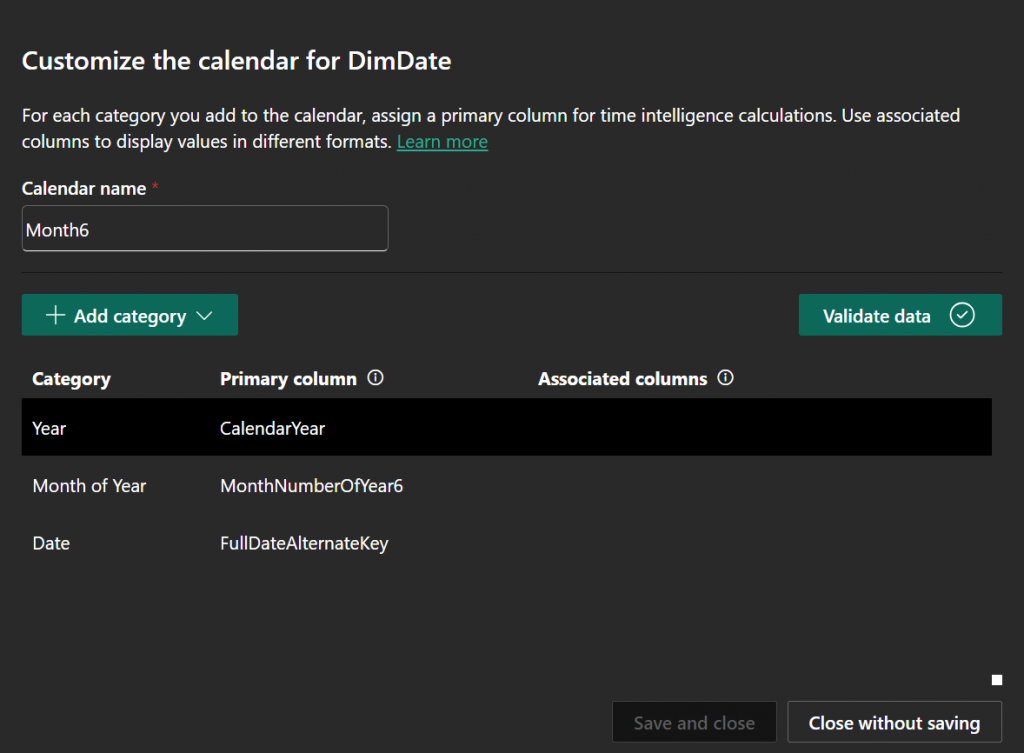
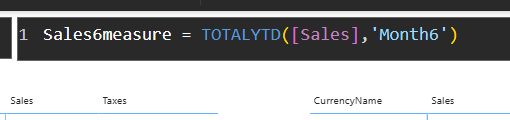
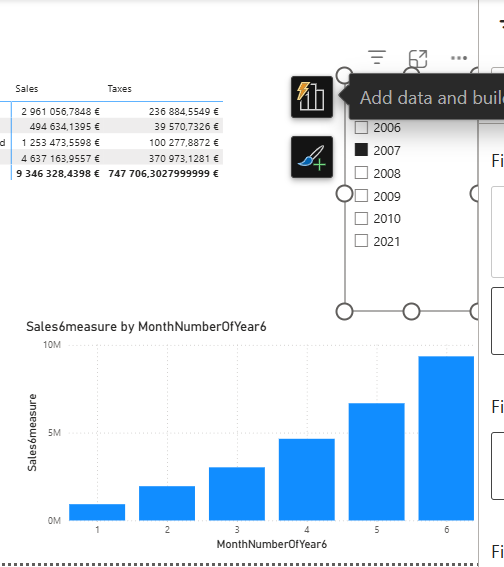
Day  12 – Custom Calendars

s

Day  13 – Relationships with DAX

Day 13 was about modifying Sales measure. You achieve goal for example like this:

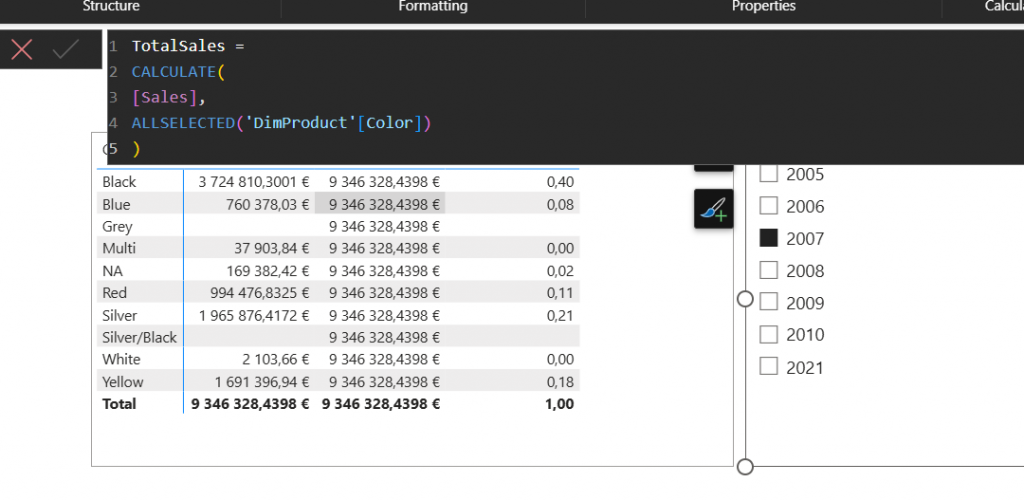
Day  14 – Sum against Total sum

Day 14 was about modifying total sales measure. Here an example:

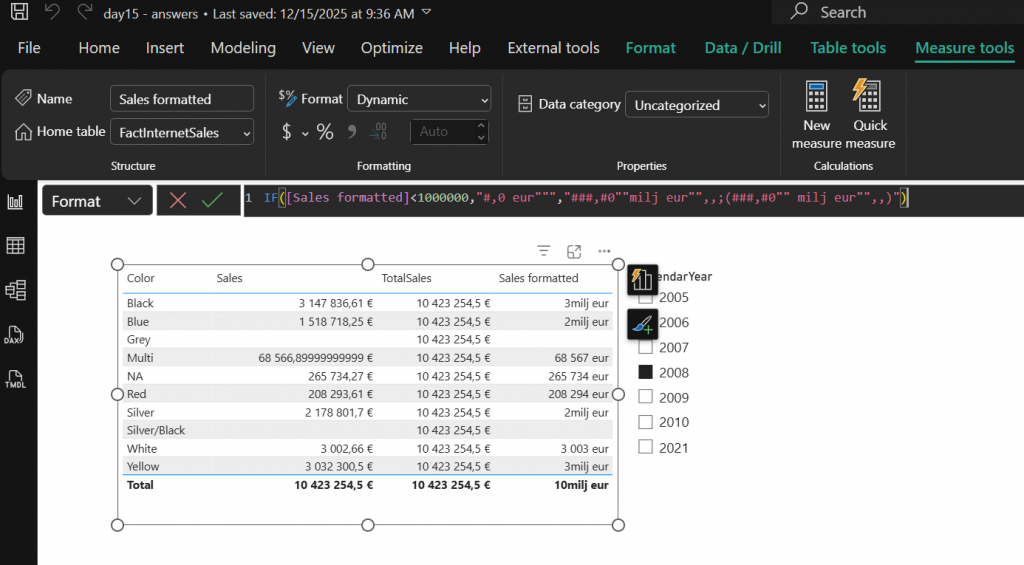
Day  15 – Formatting measures

Day 15 was about formatting measures. It can be achieved like:

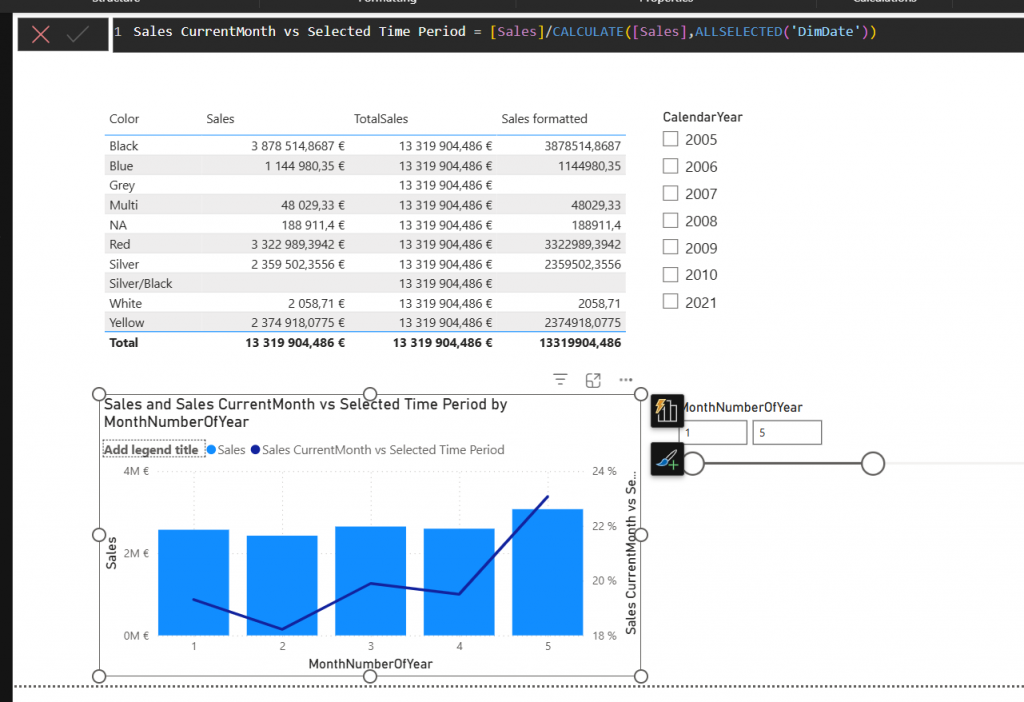
Day  16 – Sales vs total sales of selected time

Day 16 was about sales vs total sales. It was achieved with measure like:

Answers for Christmas challenge 2025 days 1-8

Ok, Here are the answers finally!

I received new answers still after the intended answer time was out so I wanted to see if someone is still doing those and did not start putting answers online. But Now! Let’s go through the first 8 questions today.

Day 1 – Power BI Sales Report

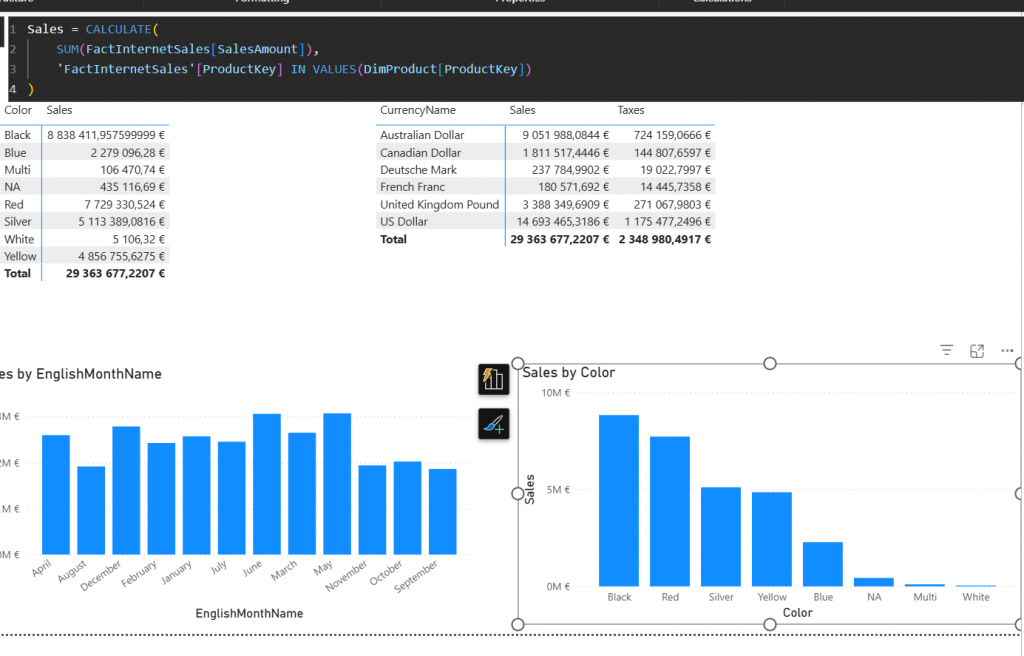
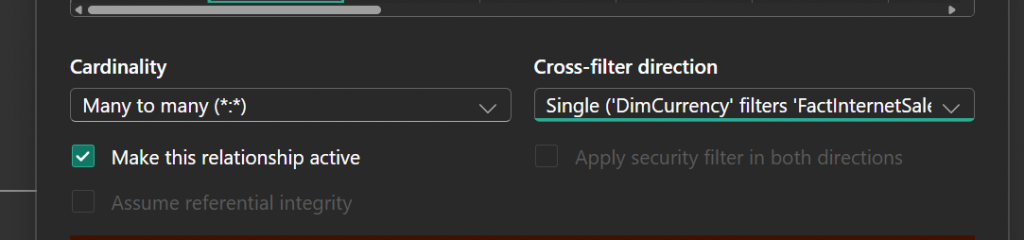
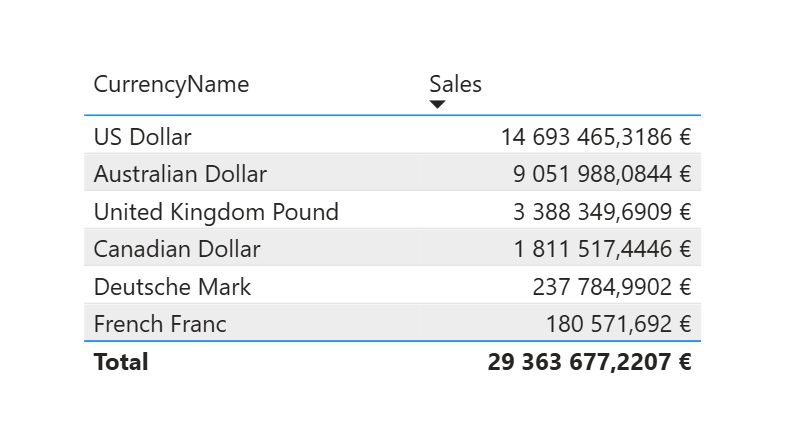
Answer to this is behind relationships. relationship between Currencies and fact is not working. It has to be activated and turned around.
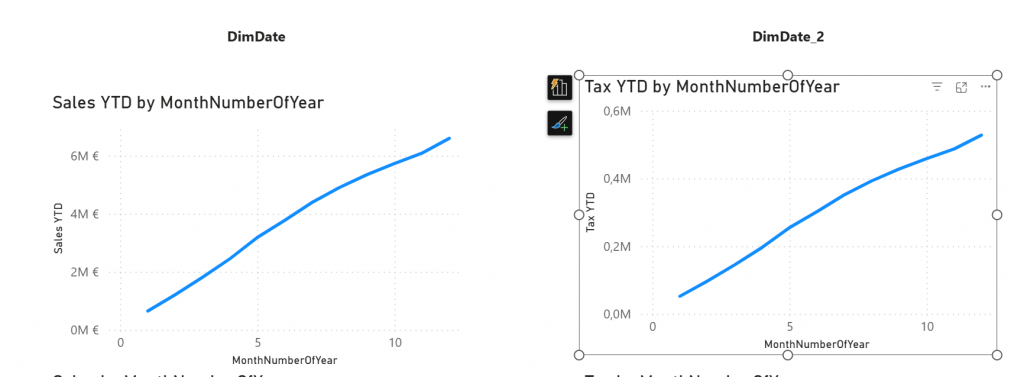
Day 2 – Power BI YTD Sales and Tax report

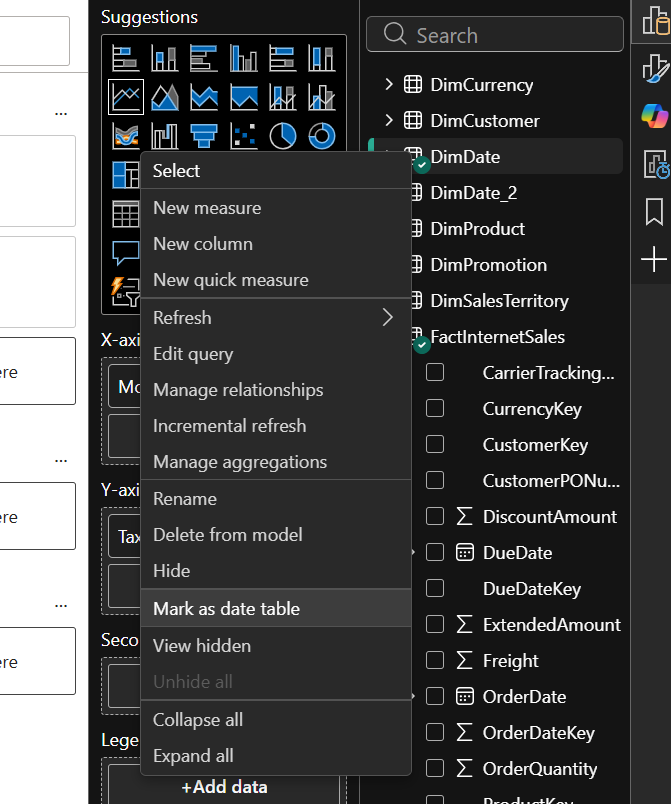
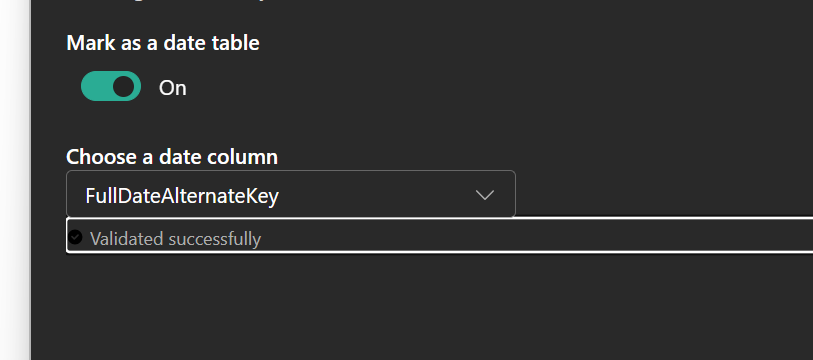
Day 2 answer is to mark table as date table.

After that visuals look ok

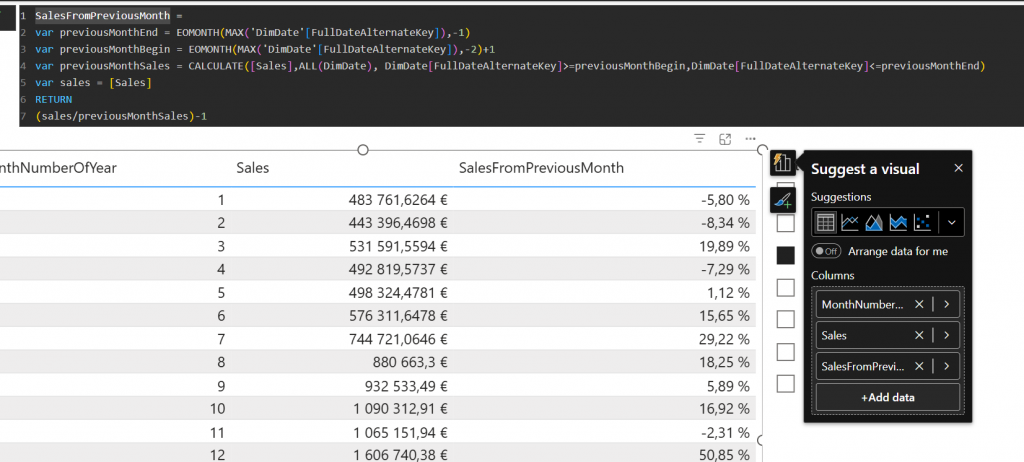
Day 3 – Sales Growth comparing previous month

Day 3 was about creating a measure. Measure took growth percentage from previous month. Here is an example how you could do that.

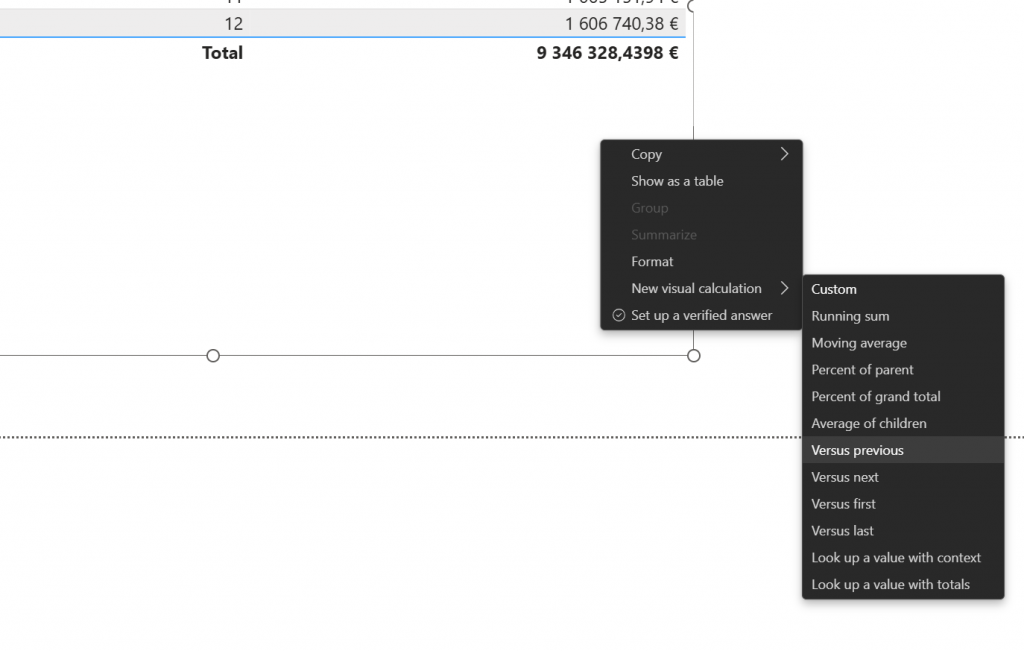
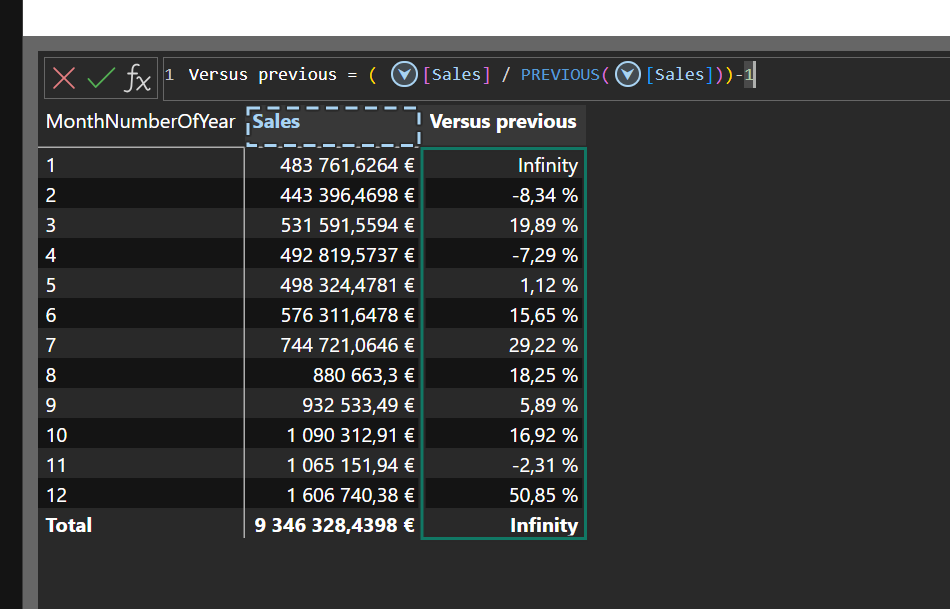
Day 4 – Sales Growth comparing previous month using visual calc

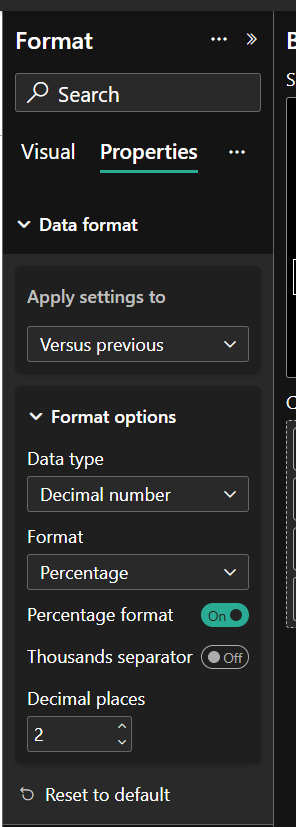
Answer to challenge was to create visual calc. With visual calc we were comparing to previous value and then formatting that as percentage.

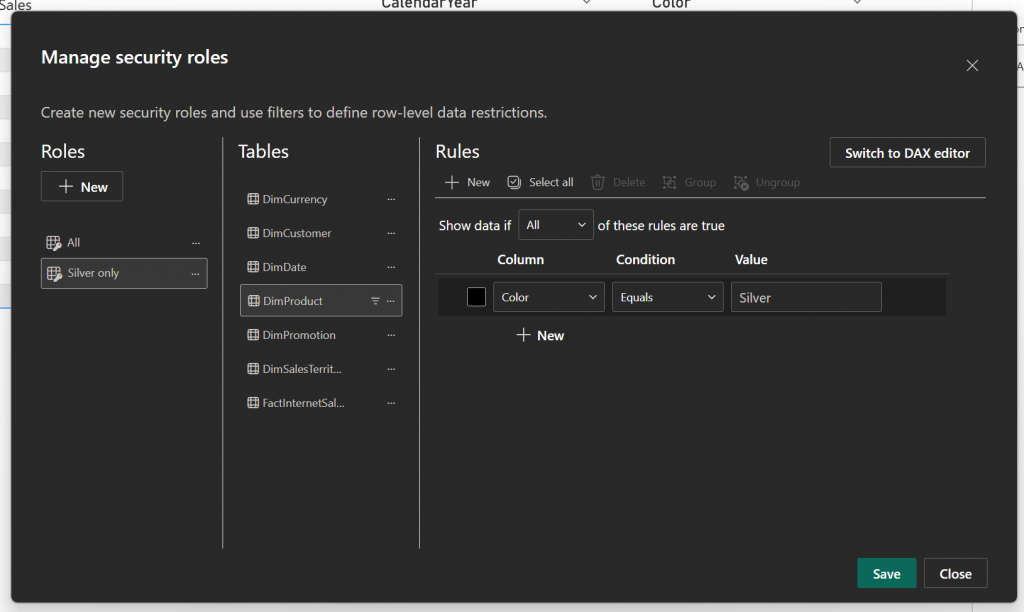
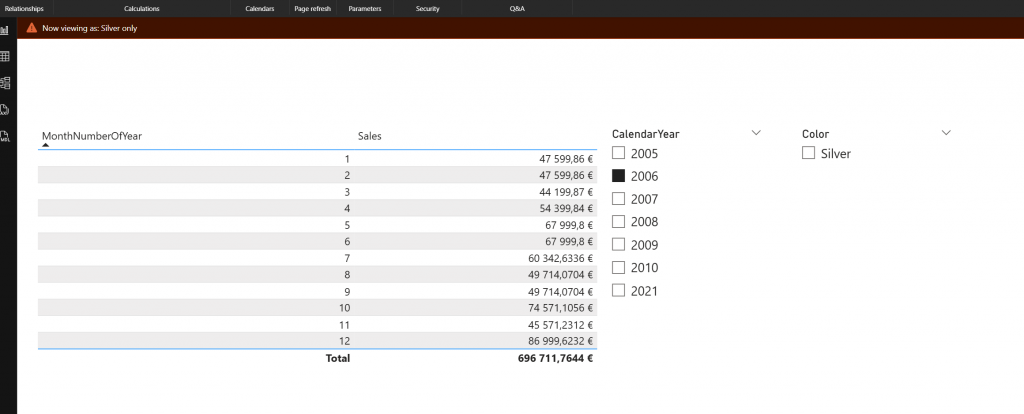
Day 5 – Roles to protect data

Day 5 challenge was about security roles. This was quite easy as this type of role can be created with user interface purely.

Day 6 – Web data and map visuals

This was a independence day celebration. There was no actual correct answer. It was just about “test map visuals”.

Day 7 – batch change within the model

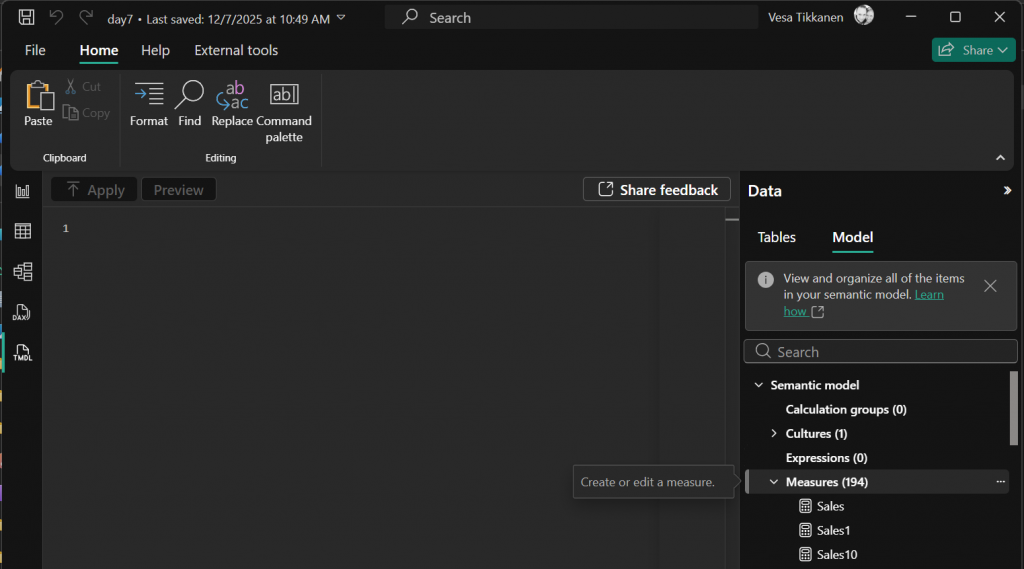
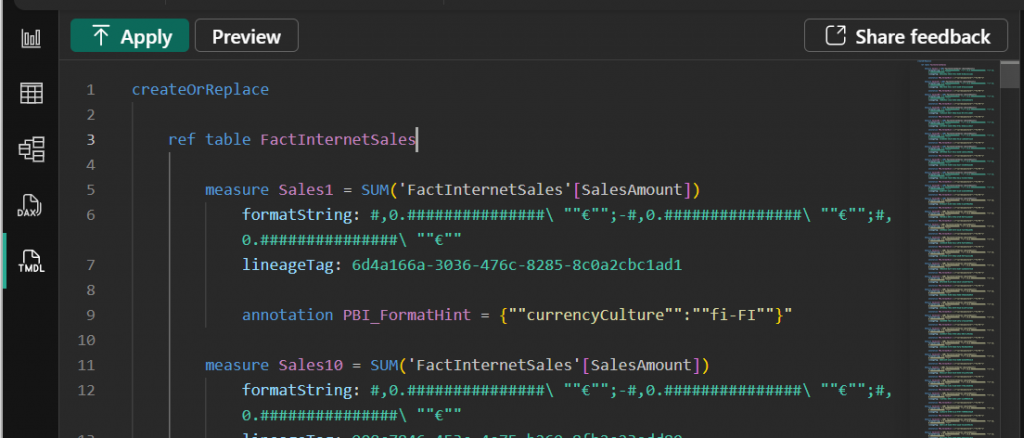
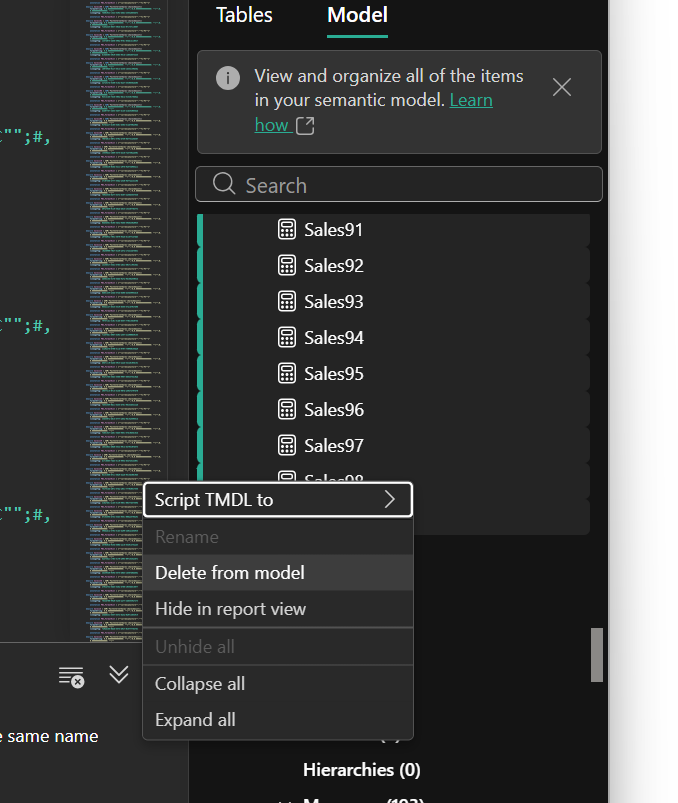
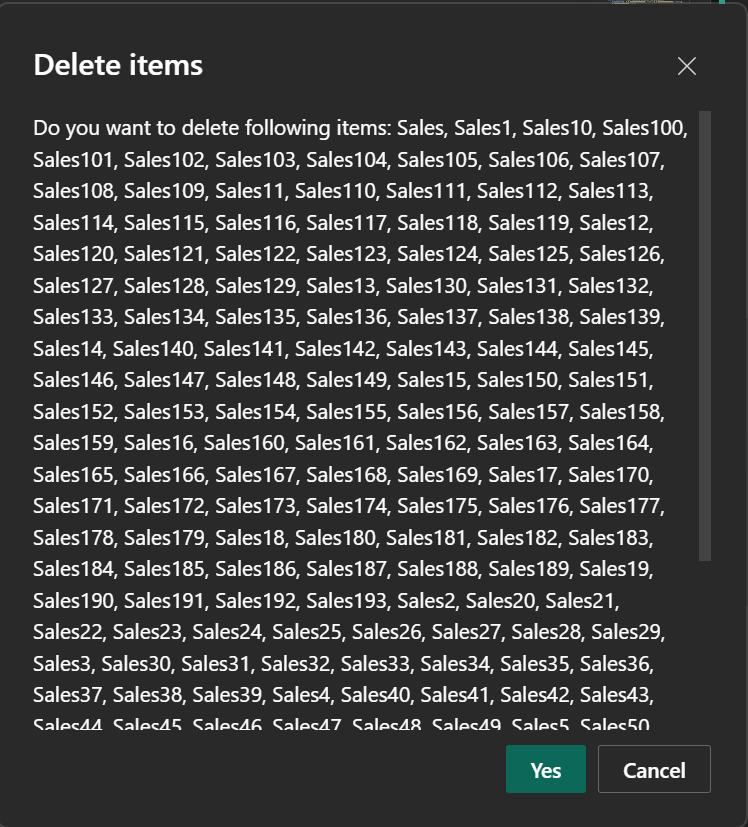
Day 7 challenge was about batch moving objects in semantic model. This can quite easily be done with tmdl view.

Within TMDL view you may script all the measures to window. Delete all measures from the model and recreate them after that.

Day 8 – Reusable code in DAX Model

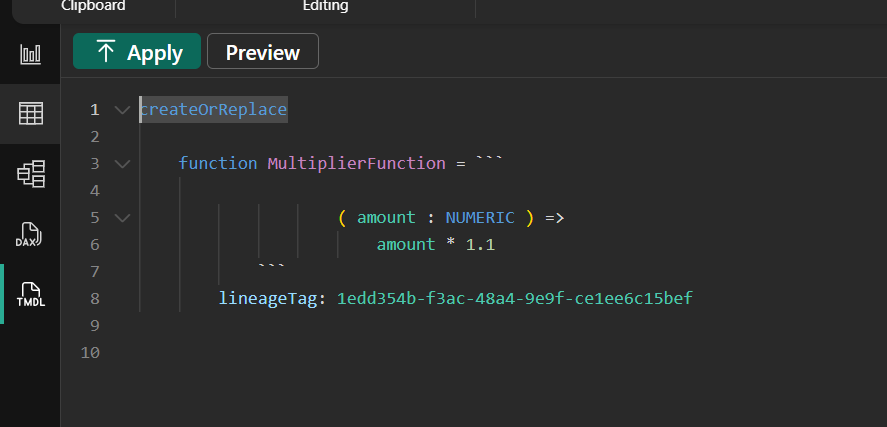
Challenge was about DAX User Defined Functions. With UDF you can create reusable code that can be called across multiple measures.

Example udf:

Christmas Challenge 2025 – Day  24 – What is the most useful Power BI Feature?

Power BI is celebrating its 10th anniversary! To mark this milestone, I invite you to participate in the Power BI Christmas and holiday season Calendar. This special event features 24 unique challenges, each designed for you to solve and enjoy throughout the season.

A new challenge will be released every day, starting December 1st and continuing through December 24th. Each day presents a fresh opportunity to test your Power BI skills and creativity.

At the conclusion of the event, a winner will be selected from among the participants. Microsoft Finland has generously offered a prize, with further details to be provided soon.

Throughout December, we will maintain and announce a leaderboard, showcasing participants’ progress. Correct answers will also be shared. You will have two days to solve each puzzle; for example, the puzzle released on day one will close at the end of day two.

Day 24 Challenge

Merry Christmas! Happy Holiday Season! Today is the day when in Finland we celebrate Christmas. Thank you for being here for these 24 days. I hope that this puzzle serie was useful for you and there was puzzles that were challenging but not too challenging. I know few were very simple and few were perhaps larger but I tried to make it so that you would not spend your whole day with the puzzle.

Now it is time to slow down and spend some time with your family. Thank you one more time!

As today’s puzzle: please describe some feature that has made you impact or some feature that you have not understood who it works or what for that feature is for? Let’s try to cover those in a coffee break’s later. Coffee Break is a webinar serie every monday 1pm finnish time. You may find the link to join the Coffee Break here: Microsoft Data Platform User Group – Finland | Meetup

You can return the answer at: https://forms.office.com/e/WM5jtZV6Eb You have until end of day 26 to answer. As today is visualization task and there is no file attachment option on the return, just describe the answer.

This Holiday season / Christmas challenge is provided by Vesa Tikkanen and is not linked to Microsoft as company. I just want us to have a puzzle every day going towards the 24th of December. This is pure community effort without any business relations behind. As such I try to do this as professional as possible but please remind that this is just for us to have fun. Microsoft finland has promised some swag as a prize but they are not related to winner pickup process neither they get any details of attendance. Information regarding attendance is not being used in any other thing than picking up the winner. So no marketing, no contacting just Power BI puzzle every day.

Christmas Challenge 2025 – Day  23 – Statistics Centre Finland Statistics

Power BI is celebrating its 10th anniversary! To mark this milestone, I invite you to participate in the Power BI Christmas and holiday season Calendar. This special event features 24 unique challenges, each designed for you to solve and enjoy throughout the season.

A new challenge will be released every day, starting December 1st and continuing through December 24th. Each day presents a fresh opportunity to test your Power BI skills and creativity.

At the conclusion of the event, a winner will be selected from among the participants. Microsoft Finland has generously offered a prize, with further details to be provided soon.

Throughout December, we will maintain and announce a leaderboard, showcasing participants’ progress. Correct answers will also be shared. You will have two days to solve each puzzle; for example, the puzzle released on day one will close at the end of day two.

Day 23 – Challenge

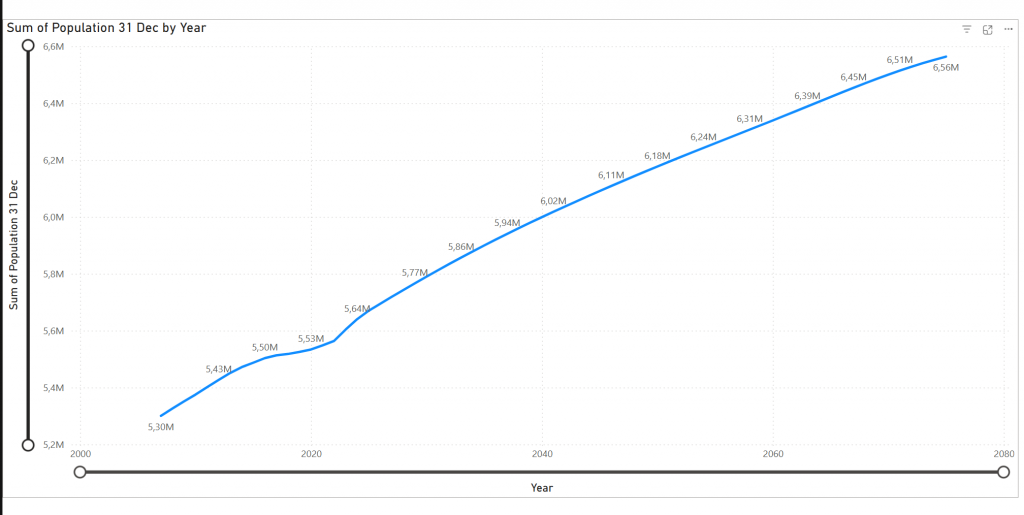
Today we map public statistical data to line chart. We want to visualize how many people there are on Finland in future based on the latest estimate of Statistics centre of Finland.

I have created a tool at http://q4.fi – which generates PowerQuery scripts for you. You can then paste these scripts into blank PowerQuery. You have to set datatypes correctly but otherwise it should be ready for consumption after that.

Create PowerQuery from:

And then press “Fact Table” at the bottom. Work your way on Power BI Desktop and final result should look like:

Describe on the answer what modifications to line chart or PowerQuery you needed to do to get to the result.

You can return the answer at: https://forms.office.com/e/EJPZtTpuYT You have until end of day 25 to answer. As today is visualization task and there is no file attachment option on the return, just describe the answer.

This Holiday season / Christmas challenge is provided by Vesa Tikkanen and is not linked to Microsoft as company. I just want us to have a puzzle every day going towards the 24th of December. This is pure community effort without any business relations behind. As such I try to do this as professional as possible but please remind that this is just for us to have fun. Microsoft finland has promised some swag as a prize but they are not related to winner pickup process neither they get any details of attendance. Information regarding attendance is not being used in any other thing than picking up the winner. So no marketing, no contacting just Power BI puzzle every day.

Christmas Challenge 2025 – Day  22 – Organisational Hierarchy Reversed

Power BI is celebrating its 10th anniversary! To mark this milestone, I invite you to participate in the Power BI Christmas and holiday season Calendar. This special event features 24 unique challenges, each designed for you to solve and enjoy throughout the season.

A new challenge will be released every day, starting December 1st and continuing through December 24th. Each day presents a fresh opportunity to test your Power BI skills and creativity.

At the conclusion of the event, a winner will be selected from among the participants. Microsoft Finland has generously offered a prize, with further details to be provided soon.

Throughout December, we will maintain and announce a leaderboard, showcasing participants’ progress. Correct answers will also be shared. You will have two days to solve each puzzle; for example, the puzzle released on day one will close at the end of day two.

Day 22 – Challenge

Yesterday was about organizational hierarchy. And as we always look at it. From top-to-down. From CEO-to-front line workers. But now it is opposite. Modify your yesteday’s implementation (and if you missed yesterday, there is still time to do that) and show the chart from bottom-to-up.

and

So now you start from employee and go to his/her manager and there to his/her manager etc.

Describe 3 levels to columns Level1, Level2 and Level3

Please describe your solution in a answer form.

Model can be found at: https://material.qumio.com/christmas2025/day22.zip

You can return the answer at: https://forms.office.com/e/ZMzpqKrsgt You have until end of day 24 to answer. As today is visualization task and there is no file attachment option on the return, just describe the answer.

This Holiday season / Christmas challenge is provided by Vesa Tikkanen and is not linked to Microsoft as company. I just want us to have a puzzle every day going towards the 24th of December. This is pure community effort without any business relations behind. As such I try to do this as professional as possible but please remind that this is just for us to have fun. Microsoft finland has promised some swag as a prize but they are not related to winner pickup process neither they get any details of attendance. Information regarding attendance is not being used in any other thing than picking up the winner. So no marketing, no contacting just Power BI puzzle every day.

Christmas Challenge 2025 – Day  21 – Organisational Hierarchy

Power BI is celebrating its 10th anniversary! To mark this milestone, I invite you to participate in the Power BI Christmas and holiday season Calendar. This special event features 24 unique challenges, each designed for you to solve and enjoy throughout the season.

A new challenge will be released every day, starting December 1st and continuing through December 24th. Each day presents a fresh opportunity to test your Power BI skills and creativity.

At the conclusion of the event, a winner will be selected from among the participants. Microsoft Finland has generously offered a prize, with further details to be provided soon.

Throughout December, we will maintain and announce a leaderboard, showcasing participants’ progress. Correct answers will also be shared. You will have two days to solve each puzzle; for example, the puzzle released on day one will close at the end of day two.

Day 21 – Challenge

You quessed right! This requirement will come always some day. Implement organizational hierarchy. There is DimEmployee table which has EmployeeKey and ParentEmployeeKey. ParentEmployeeKey defines who is the manager of the person.

Power BI does not support parent-child-hierarchies so we need to make this tabular.

Implement 4 new columns.

Path: describes the path in the parent-child hierarchy

Level1 is the Company director

Level2 are persons reporting to company director

Level3 are the persons reporting to Level2 persons

Please describe your solution in a answer form.

Model can be found at: https://material.qumio.com/christmas2025/day21.zip

You can return the answer at: https://forms.office.com/e/S9B2S54P4U You have until end of day 23 to answer. As today is visualization task and there is no file attachment option on the return, just describe the answer.

This Holiday season / Christmas challenge is provided by Vesa Tikkanen and is not linked to Microsoft as company. I just want us to have a puzzle every day going towards the 24th of December. This is pure community effort without any business relations behind. As such I try to do this as professional as possible but please remind that this is just for us to have fun. Microsoft finland has promised some swag as a prize but they are not related to winner pickup process neither they get any details of attendance. Information regarding attendance is not being used in any other thing than picking up the winner. So no marketing, no contacting just Power BI puzzle every day.

Christmas Challenge 2025 – Day  20 – Moving average at visual level

Power BI is celebrating its 10th anniversary! To mark this milestone, I invite you to participate in the Power BI Christmas and holiday season Calendar. This special event features 24 unique challenges, each designed for you to solve and enjoy throughout the season.

A new challenge will be released every day, starting December 1st and continuing through December 24th. Each day presents a fresh opportunity to test your Power BI skills and creativity.

At the conclusion of the event, a winner will be selected from among the participants. Microsoft Finland has generously offered a prize, with further details to be provided soon.

Throughout December, we will maintain and announce a leaderboard, showcasing participants’ progress. Correct answers will also be shared. You will have two days to solve each puzzle; for example, the puzzle released on day one will close at the end of day two.

Day 20 – Challenge

Today it is about Visual calcs again! Moving average is a common problem we solved with DAX few days ago. Now we would like to solve the same problem but using only visual calculations.

Add to the report’s table visual a new visual calc that counts moving average over last 3 rows.

Please describe your solution in a answer form.

Model can be found at: https://material.qumio.com/christmas2025/day20.zip

You can return the answer at: https://forms.office.com/e/CwwEGhsCSe You have until end of day 21 to answer. As today is visualization task and there is no file attachment option on the return, just describe the answer.

This Holiday season / Christmas challenge is provided by Vesa Tikkanen and is not linked to Microsoft as company. I just want us to have a puzzle every day going towards the 24th of December. This is pure community effort without any business relations behind. As such I try to do this as professional as possible but please remind that this is just for us to have fun. Microsoft finland has promised some swag as a prize but they are not related to winner pickup process neither they get any details of attendance. Information regarding attendance is not being used in any other thing than picking up the winner. So no marketing, no contacting just Power BI puzzle every day.

Christmas Challenge 2025 – Day  19 – weighted average

Power BI is celebrating its 10th anniversary! To mark this milestone, I invite you to participate in the Power BI Christmas and holiday season Calendar. This special event features 24 unique challenges, each designed for you to solve and enjoy throughout the season.

A new challenge will be released every day, starting December 1st and continuing through December 24th. Each day presents a fresh opportunity to test your Power BI skills and creativity.

At the conclusion of the event, a winner will be selected from among the participants. Microsoft Finland has generously offered a prize, with further details to be provided soon.

Throughout December, we will maintain and announce a leaderboard, showcasing participants’ progress. Correct answers will also be shared. You will have two days to solve each puzzle; for example, the puzzle released on day one will close at the end of day two.

Day 19 challenge

This is not more difficult but it requires a bit more math. Let’s continue on yesterday’s x month average measure. We need to modify that to be weighted average based on number of sales orders per month.

Above image shows the answer when weighted average is calculated over 3 months period in year 2008.

Here another example:

So You can choose timeslice. Then you can choose from the parameter how many months the weighted average is counted from and then you show the result at line and matrix visual.

Weight is based on the SalesOrdersCount and average is over Sales.

Please describe your solution in a answer form.

Model can be found at: https://material.qumio.com/christmas2025/day19.zip

You can return the answer at: https://forms.office.com/e/pfdYDXFzdE You have until end of day 21 to answer. As today is visualization task and there is no file attachment option on the return, just describe the answer.

This Holiday season / Christmas challenge is provided by Vesa Tikkanen and is not linked to Microsoft as company. I just want us to have a puzzle every day going towards the 24th of December. This is pure community effort without any business relations behind. As such I try to do this as professional as possible but please remind that this is just for us to have fun. Microsoft finland has promised some swag as a prize but they are not related to winner pickup process neither they get any details of attendance. Information regarding attendance is not being used in any other thing than picking up the winner. So no marketing, no contacting just Power BI puzzle every day.

Christmas Challenge 2025 – Day  18 – Dynamic moving average

Power BI is celebrating its 10th anniversary! To mark this milestone, I invite you to participate in the Power BI Christmas and holiday season Calendar. This special event features 24 unique challenges, each designed for you to solve and enjoy throughout the season.

A new challenge will be released every day, starting December 1st and continuing through December 24th. Each day presents a fresh opportunity to test your Power BI skills and creativity.

At the conclusion of the event, a winner will be selected from among the participants. Microsoft Finland has generously offered a prize, with further details to be provided soon.

Throughout December, we will maintain and announce a leaderboard, showcasing participants’ progress. Correct answers will also be shared. You will have two days to solve each puzzle; for example, the puzzle released on day one will close at the end of day two.

Day 18 – Challenge

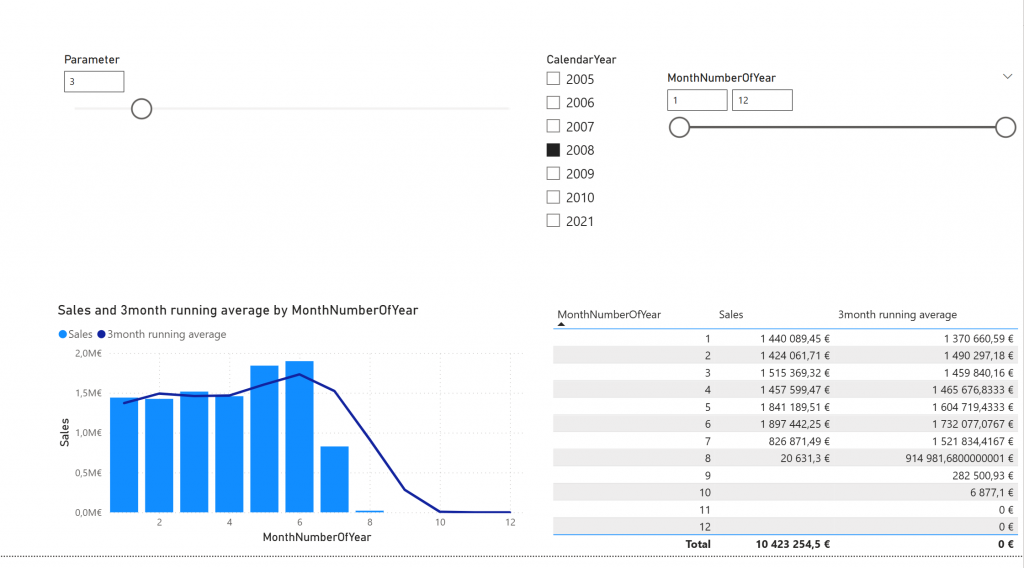
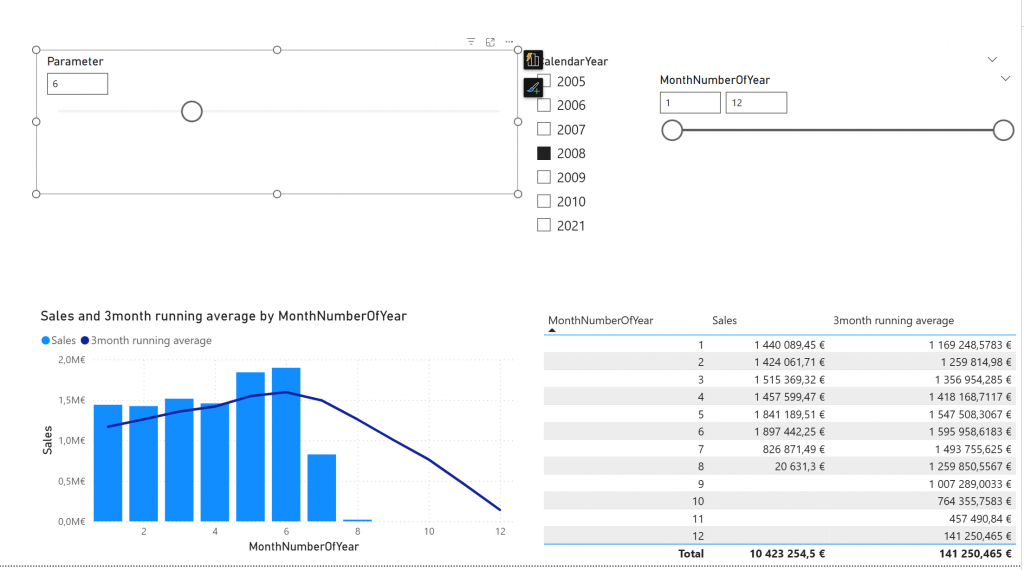
Today’s challenge is about enhancing that moving average measure. Yesterday it was static 3-months. Now it should be modified so that you can choose how many months the moving average is about.

Above is the 3 month average and after sliding the slider it changes to something else like 6 month moving average:

Please describe your solution in a answer form.

Model can be found at: https://material.qumio.com/christmas2025/day18.zip

You can return the answer at: https://forms.office.com/e/NBy5rKV1XS You have until end of day 20 to answer. As today is visualization task and there is no file attachment option on the return, just describe the answer.

This Holiday season / Christmas challenge is provided by Vesa Tikkanen and is not linked to Microsoft as company. I just want us to have a puzzle every day going towards the 24th of December. This is pure community effort without any business relations behind. As such I try to do this as professional as possible but please remind that this is just for us to have fun. Microsoft finland has promised some swag as a prize but they are not related to winner pickup process neither they get any details of attendance. Information regarding attendance is not being used in any other thing than picking up the winner. So no marketing, no contacting just Power BI puzzle every day.